PWA With Push Notifications on Cloudflare
This blog is a static site. Astro compiles everything to HTML at build time, Cloudflare Pages serves it from the edge, and that’s it. No server, no runtime, no database.
And yet — you can install it on your phone, read posts offline, and get a push notification when I publish something new. No app store. No Firebase. No OneSignal. Just the Web Push API, a Cloudflare Worker, and an n8n workflow running on a Raspberry Pi.
Here’s how it all fits together.
The Architecture
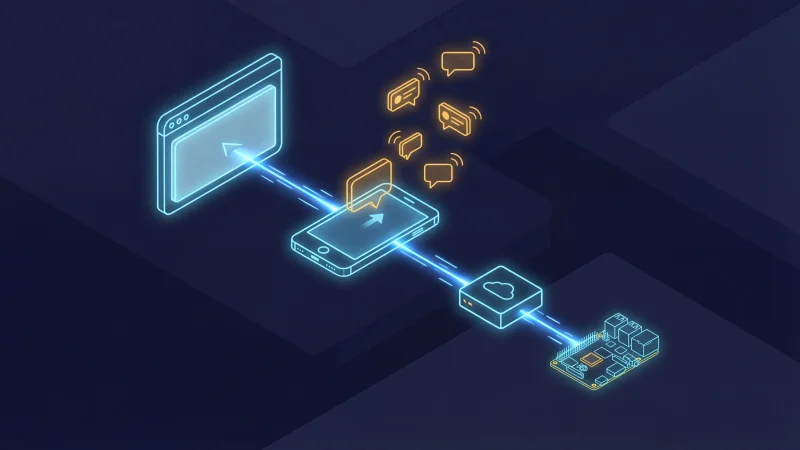
Before diving into code, let’s look at the full picture. There are three independent systems:
1. The blog itself — An Astro 6 static site deployed to Cloudflare Pages. It ships a service worker (sw.js) and a web manifest (site.webmanifest). This handles installability, offline support, and the client-side push subscription UI.
2. The push Worker — A separate Cloudflare Worker at push.blog.dsalathe.dev. It stores push subscriptions in a D1 database and implements the Web Push protocol from scratch using the Web Crypto API. Three endpoints: /subscribe, /unsubscribe, /send.
3. The n8n trigger — A daily workflow on a Raspberry Pi 5 that checks the blog’s RSS-like JSON endpoint for new posts. If it finds one published today, it calls the push Worker’s /send endpoint with the post title and URL.
The flow when I publish a new post:
- I push to
main→ Cloudflare Pages builds and deploys - Next morning at 08:00, n8n checks
/api/posts.json - n8n finds the new post → calls
POST push.blog.dsalathe.dev/send - The push Worker encrypts the notification payload for each subscriber and sends it to their browser’s push service
- The browser wakes up the service worker →
showNotification()→ the reader sees the notification
No vendor lock-in. Every piece is replaceable. The blog doesn’t even know the push Worker exists.
PWA Foundation
The Web Manifest
The manifest tells the browser this site can be installed. Nothing exotic here:
{
  "name": "David Salathe's Blog",
  "short_name": "dsalathe",
  "description": "Tech blog covering AI, Software Architecture, DevSecOps, and more.",
  "start_url": "/",
  "display": "standalone",
  "theme_color": "#1e293b",
  "background_color": "#f8fafc",
  "icons": [
    { "src": "/icon-192.png", "sizes": "192x192", "type": "image/png" },
    { "src": "/icon-512.png", "sizes": "512x512", "type": "image/png" },
    { "src": "/icon-maskable-512.png", "sizes": "512x512", "type": "image/png", "purpose": "maskable" },
    { "src": "/apple-touch-icon.png", "sizes": "180x180", "type": "image/png" }
  ]
}
The four icon variants serve different contexts: 192px for Android install, 512px for splash screens, a maskable variant with 20% safe-zone padding for adaptive icons, and a 180px Apple touch icon for iOS.
Generating Icons at Build Time
Rather than maintaining four icon files manually, a build script generates all of them from favicon.png using sharp (already an Astro dependency):
const icons = [
  { name: 'icon-192.png', size: 192 },
  { name: 'icon-512.png', size: 512 },
  { name: 'apple-touch-icon.png', size: 180 },
];

// Standard icons — simple resize
for (const { name, size } of icons) {
  await sharp(SOURCE)
    .resize(size, size, { fit: 'contain', background: { r: 255, g: 255, b: 255, alpha: 0 } })
    .png()
    .toFile(path.join(PUBLIC, name));
}

// Maskable icon — 80% of canvas, white safe-zone background
const innerSize = Math.round(512 * 0.8);
const iconBuffer = await sharp(SOURCE).resize(innerSize, innerSize).png().toBuffer();

await sharp({ create: { width: 512, height: 512, channels: 4, background: '#ffffff' } })
  .composite([{ input: iconBuffer, gravity: 'centre' }])
  .png()
  .toFile(path.join(PUBLIC, 'icon-maskable-512.png'));
This runs as part of the build pipeline via pnpm build. One source file, four outputs.
Service Worker Registration
The service worker is registered from the base layout with a script tag marked data-swup-ignore-script — critical for compatibility with Swup’s client-side navigation, otherwise Swup would re-execute the registration on every page transition:
<script data-swup-ignore-script>
  if ('serviceWorker' in navigator) {
    navigator.serviceWorker.register('/sw.js');
  }
</script>
The Service Worker
The service worker uses five different fetch strategies depending on what’s being requested. No Workbox, no abstraction layer — just a fetch event listener with some if statements.
Strategy 1: HTML Pages — Network-First
Blog content changes with every deploy. When online, always get the latest version. Cache the response so it’s available offline. If both network and cache fail, show the offline page.
if (isNavigationRequest(request)) {
  event.respondWith(
    fetch(request)
      .then((response) => {
        if (response.ok) {
          const clone = response.clone();
          caches.open(CACHE_NAME).then((cache) => cache.put(request, clone));
        }
        return response;
      })
      .catch(() =>
        caches.match(request).then((cached) => cached || caches.match('/offline/'))
      )
  );
  return;
}
Strategy 2: Static Assets — Cache-First
Everything under /_assets/ is content-hashed by Vite. If the hash is in the URL, it’s immutable — serve from cache, fetch only on miss.
Strategy 3: Images — Network-First with 3-Day TTL
Images are cached opportunistically when the user views a page, but they expire after 3 days to avoid filling up device storage. This is a middle ground: if you download posts for a flight, the cover images and diagrams are there. But we don’t keep them indefinitely.
The implementation stamps each cached image response with a custom sw-cache-time header. On a cache hit while offline, the service worker checks the timestamp and discards anything older than 3 days:
// On network success — cache with timestamp
const headers = new Headers(clone.headers);
headers.set('sw-cache-time', Date.now().toString());
cache.put(request, new Response(clone.body, { status: clone.status, headers }));

// On network failure — serve from cache if within TTL
const cacheTime = parseInt(cached.headers.get('sw-cache-time') || '0', 10);
if (cacheTime && (Date.now() - cacheTime) > IMAGE_MAX_AGE_MS) {
  cache.delete(request);
  return undefined;  // no cached image — browser shows broken image
}
return cached;
Strategy 4: External Requests — Network-Only
Analytics scripts, third-party widgets, external APIs — these should never hit the cache.
Strategy 5: Everything Else — Network-First with Cache
JSON endpoints, non-hashed CSS/JS — try the network, cache the result, fall back to cache on failure.
Cache Versioning
All caches use the key dsalathe-blog-v1. On activation, any old dsalathe-blog-* caches are cleaned up:
self.addEventListener('activate', (event) => {
  event.waitUntil(
    caches.keys().then((keys) =>
      Promise.all(
        keys
          .filter((key) => key.startsWith('dsalathe-blog-') && key !== CACHE_NAME)
          .map((key) => caches.delete(key))
      )
    ).then(() => self.clients.claim())
  );
});
The Offline Page
When a user navigates to a page that’s not cached while offline, they see a friendly fallback instead of a browser error. It’s precached during the install event so it’s always available:
const PRECACHE_URLS = ['/offline/'];

self.addEventListener('install', (event) => {
  event.waitUntil(
    caches.open(CACHE_NAME)
      .then((cache) => cache.addAll(PRECACHE_URLS))
      .then(() => self.skipWaiting())
  );
});
Download All Content for Offline Reading
PWA users see a slim banner: “Offline mode — Save all pages to read without internet” with a Download button. It fetches both /api/posts.json and /api/concepts.json, builds a URL list that includes the home page, the /posts/ listing, every post, and every concept page, then caches each response into the service worker’s cache. A progress bar shows the download status.
This banner only appears when running in standalone display mode — regular browser visitors never see it. If dismissed, the banner reappears on the next page reload or new session — using sessionStorage instead of localStorage so the decision doesn’t stick forever. After downloading, localStorage remembers the “already downloaded” state and the button changes to “Update your offline cache” for subsequent visits.
Push Notifications
This is where it gets interesting. Push notifications on the web require three things:
- Client-side: Subscribe the user via the Push API, send the subscription to your server
- Server-side: Store subscriptions, encrypt payloads per the Web Push protocol, send them to the browser vendor’s push service
- Trigger: Something that decides when to send a notification
Client-Side: The Subscription Flow
The push subscribe UI lives in the blog’s header — a bell icon in the RSS dropdown menu on desktop, and in the mobile hamburger menu. Both use the same logic:
async function subscribe() {
  const permission = await Notification.requestPermission();
  if (permission !== 'granted') return;

  const reg = await navigator.serviceWorker.ready;
  const subscription = await reg.pushManager.subscribe({
    userVisibleOnly: true,
    applicationServerKey: urlBase64ToUint8Array(VAPID_PUBLIC_KEY),
  });

  await fetch(PUSH_WORKER_URL + '/subscribe', {
    method: 'POST',
    headers: { 'Content-Type': 'application/json' },
    body: JSON.stringify({ subscription: subscription.toJSON() }),
  });

  localStorage.setItem('push-subscribed', 'true');
}
For PWA users who haven’t subscribed, a one-time toast appears after 3 seconds: “Stay updated! Get notified when new posts are published.” with Enable and Not now buttons. Dismissed state is stored in localStorage so it never appears again.
PushManager and Notification. Users on browsers without push support never see a broken button. Receiving Notifications in the Service Worker
When the browser’s push service delivers a message, the service worker wakes up:
self.addEventListener('push', (event) => {
  const data = event.data.json();
  event.waitUntil(
    self.registration.showNotification(data.title || 'New post', {
      body: data.body || '',
      icon: '/icon-192.png',
      badge: '/icon-192.png',
      data: { url: data.url || '/' },
      tag: 'new-post',
      renotify: true,
    })
  );
});

self.addEventListener('notificationclick', (event) => {
  event.notification.close();
  const url = event.notification.data?.url || '/';
  event.waitUntil(
    self.clients.matchAll({ type: 'window', includeUncontrolled: true }).then((clients) => {
      for (const client of clients) {
        if (new URL(client.url).pathname === url && 'focus' in client) return client.focus();
      }
      return self.clients.openWindow(url);
    })
  );
});
Clicking the notification either focuses an existing tab showing that post or opens a new one.
The Push Worker
This is a standalone Cloudflare Worker at push.blog.dsalathe.dev. It has no npm dependencies — the entire Web Push protocol is implemented using the Web Crypto API that’s available in Workers natively.
Why No Library?
Most tutorials use the web-push npm package. It’s fine for Node.js, but it depends on Node’s crypto module which doesn’t exist in Cloudflare Workers. Instead of shimming Node APIs, I implemented the two relevant RFCs directly:
- RFC 8291 — Message Encryption for Web Push (aes128gcm content encoding)
- RFC 8292 — Voluntary Application Server Identification (VAPID)
The result is about 150 lines of cryptographic code using crypto.subtle. It’s surprisingly readable once you understand the flow.
The Encryption Flow
Every push notification is encrypted specifically for the recipient. The browser generates a P-256 key pair when the user subscribes and gives you the public key (p256dh) and an auth secret. Here’s how the encryption works:
- Generate an ephemeral ECDH key pair (fresh for every notification)
- ECDH key agreement between your ephemeral private key and the subscriber’s public key → shared secret
- HKDF to derive an intermediate key from the auth secret and shared secret
- HKDF again to derive the AES-128-GCM content encryption key and nonce
- Encrypt the JSON payload with AES-128-GCM
- Build the aes128gcm header (salt + record size + your ephemeral public key)
- Generate a VAPID JWT signed with your server’s private key
async function encryptPayload(payload, clientPublicKeyB64, clientAuthB64) {
  const clientPublicKey = base64urlToUint8Array(clientPublicKeyB64);
  const clientAuth = base64urlToUint8Array(clientAuthB64);

  // Ephemeral ECDH key pair
  const localKeyPair = await crypto.subtle.generateKey(
    { name: 'ECDH', namedCurve: 'P-256' }, true, ['deriveBits']
  );

  // ECDH shared secret
  const clientKey = await crypto.subtle.importKey('raw', clientPublicKey,
    { name: 'ECDH', namedCurve: 'P-256' }, false, []);
  const sharedSecret = new Uint8Array(
    await crypto.subtle.deriveBits({ name: 'ECDH', public: clientKey },
      localKeyPair.privateKey, 256)
  );

  // HKDF: derive IKM, then CEK + nonce
  const salt = crypto.getRandomValues(new Uint8Array(16));
  const ikm = await hkdfDerive(clientAuth, sharedSecret, authInfo, 32);
  const cek = await hkdfDerive(salt, ikm, cekInfo, 16);
  const nonce = await hkdfDerive(salt, ikm, nonceInfo, 12);

  // AES-128-GCM encrypt
  const encrypted = await crypto.subtle.encrypt(
    { name: 'AES-GCM', iv: nonce }, cryptoKey, paddedPayload
  );

  // ... build aes128gcm header and return
}hkdfDerive function is a thin wrapper around crypto.subtle.deriveBits with HKDF. The full implementation is in the push Worker source. D1 for Subscription Storage
Subscriptions are stored in a Cloudflare D1 database (SQLite at the edge). The schema is minimal:
CREATE TABLE IF NOT EXISTS subscriptions (
  id INTEGER PRIMARY KEY AUTOINCREMENT,
  endpoint TEXT NOT NULL UNIQUE,
  p256dh TEXT NOT NULL,
  auth TEXT NOT NULL,
  created_at TEXT DEFAULT (datetime('now'))
);
The UNIQUE constraint on endpoint enables idempotent subscribes via ON CONFLICT DO UPDATE. If a user re-subscribes (e.g., after clearing browser data), their keys are updated rather than creating a duplicate.
The /send Endpoint
Protected by a Bearer token, it fetches all subscriptions, encrypts and sends a push to each, and auto-cleans expired ones:
async function handleSend(request, env, origin) {
  // Verify auth token
  const token = request.headers.get('Authorization')?.replace('Bearer ', '');
  if (token !== env.SEND_AUTH_TOKEN) {
    return corsResponse(origin, JSON.stringify({ error: 'Unauthorized' }), { status: 401 });
  }

  const payload = await request.json();
  const { results: subs } = await env.DB.prepare('SELECT * FROM subscriptions').all();

  let sent = 0, failed = 0;
  const toDelete = [];

  for (const sub of subs) {
    const result = await sendPushNotification(
      { endpoint: sub.endpoint, keys: { p256dh: sub.p256dh, auth: sub.auth } },
      JSON.stringify(payload), env
    );

    if (result.ok) sent++;
    else if (result.status === 404 || result.status === 410) toDelete.push(sub.endpoint);
    else failed++;
  }

  // Clean expired subscriptions
  for (const endpoint of toDelete) {
    await env.DB.prepare('DELETE FROM subscriptions WHERE endpoint = ?').bind(endpoint).run();
  }

  return corsResponse(origin, JSON.stringify({ sent, failed, cleaned: toDelete.length }));
}
HTTP 404 and 410 from the push service mean the subscription is dead — the user unsubscribed, reinstalled their browser, or the subscription just expired. Cleaning these up on every send keeps the database tidy without a separate cron job.
VAPID Keys
VAPID (Voluntary Application Server Identification) lets the push service know who’s sending the notification. You generate a P-256 key pair once:
const { publicKey, privateKey } = crypto.generateKeyPairSync('ec', {
  namedCurve: 'P-256',
});
The public key goes in the manifest and the client-side subscription code. The private key is stored as a Cloudflare Worker secret (wrangler secret put VAPID_PRIVATE_KEY). Never expose it.
The n8n Automation
I already run n8n on a Raspberry Pi 5 for various automations. Adding a “notify subscribers about new posts” workflow was straightforward:
- Schedule Trigger — Cron: every day at 08:00
- HTTP Request —
GET https://blog.dsalathe.dev/api/posts.json - Code Node — Filter posts where
publishedDatematches today - HTTP Request — For each new post:
POST https://push.blog.dsalathe.dev/sendwith the Bearer token and{ title, body, url }
$input.all().map(item => item.json) to reconstitute the original array before filtering. Why n8n instead of a Cron Trigger on the Worker itself? Because the Worker would need to somehow know which posts are “new” — it would need state. n8n already has the workflow engine, the credential management, the visual debugging, and I can extend it later (e.g., also post to LinkedIn, cross-post to other platforms). A Raspberry Pi running 24/7 costs essentially nothing.
The Install Banner Mess
This deserves its own section because beforeinstallprompt is genuinely frustrating.
The Web App Install API gives you a beforeinstallprompt event that fires when the browser determines your site is installable. You intercept it, store the event, and show your own custom install UI. When the user clicks your button, you call event.prompt() to trigger the native install dialog.
Sounds clean. In practice:
- Chrome/Edge on Android: Works as expected. The event fires, you capture it, your button triggers the native prompt.
- iOS Safari: This event does not exist. There is no programmatic install prompt on iOS. Users have to know to tap Share → Add to Home Screen. You can show instructional text, but you can’t trigger the actual install flow.
- Desktop browsers: The event fires, but browsers also show their own install button in the address bar. You’re competing with the browser’s UI.
- Timing: The event fires once. If you miss it (e.g., your script loaded late), you don’t get another chance until the user revisits.
My approach: only show the install banner on mobile (UA detection + touch capability + viewport width), intercept beforeinstallprompt, and hide the banner entirely in standalone mode (already installed). A 7-day cooldown after dismissal prevents nagging. It works for the Chrome/Android case — which is the majority of mobile PWA installs — and accepts that iOS users need to discover the install option themselves.
window.addEventListener('beforeinstallprompt', (e) => {
  e.preventDefault();
  deferredPrompt = e;
  if (isMobile) banner.classList.remove('hidden');
});

installBtn.addEventListener('click', async () => {
  if (!deferredPrompt) return;
  deferredPrompt.prompt();
  const result = await deferredPrompt.userChoice;
  if (result.outcome === 'accepted') banner.classList.add('hidden');
  deferredPrompt = null;
});
It’s the best you can do with the current state of the API. Not great, but functional.
Design Decisions
No PWA Library
Astro has a few PWA integrations (@vite-pwa/astro, etc.), but they’re designed for more complex apps. A service worker for a static blog is simple enough to write by hand. The whole sw.js is about 230 lines, and I understand every line of it. When something breaks, I don’t have to debug through an abstraction layer.
No External Push Service
OneSignal, Firebase Cloud Messaging, Pusher — they all work, but they add a dependency I don’t need. The Web Push protocol is an open standard. The encryption is about 150 lines of code using Web Crypto. The subscription storage is a single D1 table. Full ownership means I can inspect, debug, and modify every part of the pipeline.
Network-First for HTML
Some PWA guides recommend cache-first for everything. For a blog that updates with every deploy, that means readers would see stale content until the service worker updates. Network-first ensures they always get the latest version when online, with the cache as a genuine fallback for offline use.
Image Caching with a Short TTL
Initially I didn’t cache images at all — the reasoning was that cover images and diagrams consume device storage for marginal benefit. In practice, reading a cached post offline without its images felt broken. A 3-day TTL is the compromise: images you’ve viewed recently are available offline (perfect for saving content before a flight), but they don’t accumulate indefinitely. The TTL is enforced by the service worker itself via a custom header timestamp, not by HTTP cache headers.
Swup Compatibility
This blog uses Swup for client-side page transitions. All inline scripts related to PWA functionality use data-swup-ignore-script to prevent Swup from re-executing them during navigation. Service worker registration and push subscription logic should run exactly once on initial page load, not on every soft navigation.
Results
The PWA is live on this blog. It’s too early for meaningful engagement metrics — the feature just shipped. But the infrastructure works end to end:
- Install: Works on Chrome/Edge Android. iOS users can add to home screen manually.
- Offline: Previously visited pages (including images) are available offline. The “Download all” feature caches every post, concept, and listing page.
- Push: Subscribers get a notification the morning after a new post goes live. Clicking it opens the post.
- Cleanup: Expired subscriptions are automatically removed on every send.
- Cost: $0. Cloudflare Workers free tier, D1 free tier, n8n self-hosted on a Raspberry Pi I already had.
Final Thoughts
The web platform has gotten remarkably capable. Service workers, the Push API, Web Crypto, Cloudflare Workers, D1 — all free, all standards-based (or close to it), all under your control. You don’t need Firebase. You don’t need a native app. You don’t need a push notification SaaS.
The hardest part wasn’t the cryptography or the service worker — it was the beforeinstallprompt API and its inconsistent behavior across browsers. The Web Push encryption, once you read the RFC, is actually straightforward with crypto.subtle. The service worker strategies are a few if statements. The n8n workflow is four nodes.
If you’re running a static site and want push notifications, the barrier is lower than you think. The entire push Worker has zero npm dependencies. The service worker is about 230 lines. And the result is a genuine native-feeling experience — installable, offline-capable, with real push notifications — built entirely on open web standards.
Have questions about the implementation? Find me on GitHub or LinkedIn.
