
Obsidian Bases
Intelligence Networks & Case Resolution
Having mastered visual intelligence and professional presentation in Part 4, you are now ready to create dynamic intelligence networks and apply your complete methodology to solve complex cases. This is Part 5 of our comprehensive series.
Chapter X: The Intelligence Network
Why You Need Dynamic Databases
“Watson,” Holmes declared, settling into his chair, “we have mastered case management, but true detective work requires a comprehensive intelligence network. Every person, location, and piece of evidence must be catalogued and instantly accessible.”
“Consider your typical contact list—a static repository that tells you nothing about relationships, involvement in cases, or patterns. Criminal investigation requires dynamic intelligence that adapts to our analytical needs.”
“Fortunately, Obsidian’s ‘bases’ system doesn’t just store information—it reveals patterns, enables filtering, provides multiple views of the same data, and automatically updates as new information becomes available.”
- Academic Research: Track papers, authors, and citations across projects
- Project Management: Monitor team members, tasks, and meetings per project
- Content Creation: Organize characters, plot points, and references for writing
- Business Development: Track contacts, companies, and opportunities
Setting Up Your Intelligence Infrastructure
How do I create my Bases workspace?

The Personnel Registry
“We’ll create a ‘People’ base—our complete registry of every individual connected to our investigations.”
How do I configure my People Base?

“Already you can see the elegance—every person we’ve documented appears in a clean, organized list. But the true power lies in multiple presentation formats.”
Visual Intelligence Gallery
How do I create a Gallery View?

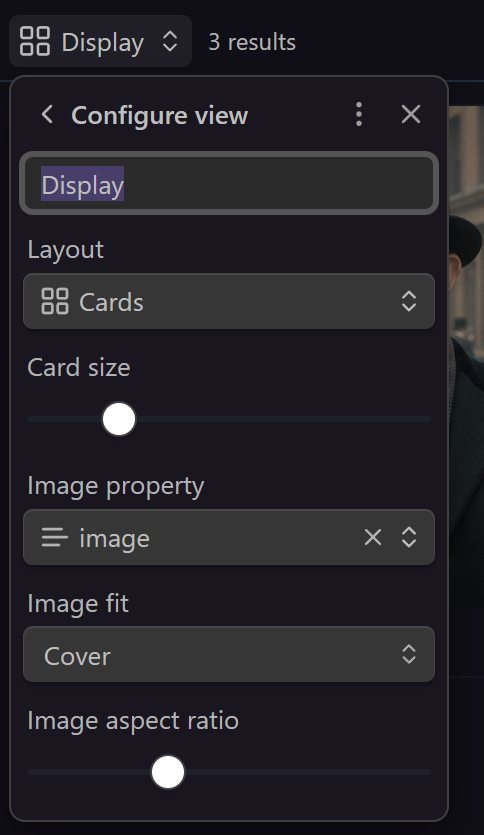

Dynamic Context Intelligence
“Here’s where bases truly shine, Watson—imagine if every case file could automatically display only the people relevant to that specific investigation.”
How do I create a Dynamic 'In File' View?


“But Holmes,” Watson protested, examining the empty view, “it shows nothing!”
“Patience, my dear fellow. Genius reveals itself to those who wait.”
How do I test the Dynamic Intelligence?
Watson typed the addition, and suddenly the magic revealed itself.

- Centralized Intelligence: Every person appears in master registries
- Multiple Perspectives: Same data as lists, galleries, or filtered views
- Dynamic Context: Automatic filtering based on document content
- Visual Recognition: Gallery views for instant identification
- Zero Maintenance: The system updates itself as you work
“I can see why you love Obsidian so much, Holmes,” Watson remarked, studying the dynamic display. “Showing the people cited in each meeting is brilliant. But I only wish we could reverse the perspective—view which meetings mention a specific person!”
“Of course we can, Watson!” Holmes exclaimed. “The system works bidirectionally. Observe:“
Reverse Intelligence Tracking
How do I create a Meetings Base with Reverse Links?
“Remarkable!” Watson gasped, watching the view populate automatically.

What You’ve Achieved:
- Person → Meetings: See all meetings mentioning a specific individual
- Meeting → People: See all people mentioned in a specific meeting
- Automatic Updates: Both views refresh as you add links
- Temporal Context: The
Whenformula shows relative time (“2 days ago”, “last week”) - Complete Context: Each meeting shows type, case, and full attendee list
“Now we have complete bidirectional intelligence, Watson. From any person’s profile, we see their meeting history. From any meeting, we see all participants. The network reveals itself from every angle.”
This bidirectional linking works for any domain:
- Academic: Papers ↔ Authors, Conferences ↔ Attendees
- Business: Projects ↔ Clients, Meetings ↔ Stakeholders
- Personal: Books ↔ Authors, Events ↔ Friends
Chapter XI: The Final Resolution
The Truth About Sir Reginald
“Watson,” Holmes announced, “the time has come to apply our systematic intelligence network to uncover the truth about our supposed client.”
Holmes accessed their People base, which now displayed all individuals connected to the case with complete context.
“Our vault is missing Marcus Blackwood, Reginald’s Swiss Banker, responsible of his company’s account!”
Copy the image below, paste it in any note temporarily and create a new People using the appropriate template:

Then add the following information in Blackwood’s note:
- Markus is [[Reginald Pumpernickel]]'s personal banker.
- Swiss police noticed abnormal activity on the [[Swiss Account 1234]].
Finally, add the following information in Reginald’s note:
- Mr Pumpernickel claims his [[Swiss Account 1234]] has been emptied illegally.
- The fraud was discovered on [[2025-09-08]].
“Observe what our intelligence network reveals about Sir Reginald himself…”
Using the gallery view, Watson could immediately see:
- Sir Reginald’s photo and documented meetings
- Marcus Blackwood and the startup founders
- Connection patterns revealed through the graph view
The Visual Intelligence Breakthrough
“Watson, examine the local graph view for Sir Reginald’s profile.”
- Open Reginald’s note
- Open the local graph view on the right sidebar.
- In
filters, changedepthto 2 and toggleNeighbor links - Observe the triangle between Reginald, Mr Blackwood and the Swiss account.

The graph showed something extraordinary: the connection revealed a bank account number that appeared in both Sir Reginald’s note properties and Marcus Blackwood’s contact information—the same account that allegedly received the ‘stolen’ investment funds.
Their systematic daily chronicles revealed the timeline discrepancy:
- Sir Reginald claimed to discover the fraud on September 8th
- But their meeting notes showed he knew specific details about the company’s operations that weren’t publicly available
- Bank records (captured through their evidence templates) showed money flowing TO Sir Reginald, not from him
The Deductive Resolution
“The beauty of systematic intelligence, Watson, is that it reveals truth automatically. Sir Reginald wasn’t the victim—he was the mastermind.”
- The Real Operation: Sir Reginald used us to create legitimate-looking investigation documents
- The Purpose: To provide ‘evidence’ of his own victimhood for insurance fraud
- The Method: Hired us thinking we’d produce a cursory report he could manipulate
“Our comprehensive intelligence network documented everything—including connections he thought we’d never discover and patterns he assumed we’d miss.”
Professional Resolution
In their next meeting with Sir Reginald, Holmes presented the evidence through their professional presentation system:
“Sir, our intelligence network has revealed some… interesting connections between yourself and Mr. Blackwood. Perhaps you’d care to explain these financial transactions that predate your supposed investment by six months?”
Sir Reginald’s confession came quickly when faced with their systematic documentation. The insurance fraud scheme collapsed under the weight of their organized evidence.
The Systematic Advantage Demonstrated
“Watson, consider what our systematic approach accomplished:
Comprehensive Intelligence:
- Automatic pattern recognition across all documented individuals
- Visual connections that revealed the hidden relationship
- Timeline analysis through daily chronicles exposing discrepancies
- Professional documentation that criminal couldn’t refute
The Network Effect:
- Every case now benefits from accumulated intelligence
- Every new investigation adds to our knowledge base
- Every observation contributes to pattern recognition”
Chapter XII: The Master’s Arsenal
Advanced Tools for Specialized Needs
Holmes set down his pipe and gestured toward the cluttered mantelpiece of 221B Baker Street.
“Before we conclude our journey, Watson, several additional instruments merit consideration for specialized investigative requirements. But heed this carefully—”
“Superior detection lies not in accumulating every available tool, but in judicious selection of instruments that amplify natural abilities without creating dependency or complexity. Each addition must earn its place through demonstrated value.”
Holmes leaned forward, his eyes gleaming with intensity. “Going too deep into customizations also implies breaking standards and making your system less portable and harder to maintain. Remember this always.”
Tools We’ve Mastered in This Series
“First, acknowledge what we’ve already deployed:”
- Templater (Part 3) — Template automation
- Journals (Part 3) — Handles daily/weekly/monthly views elegantly in one plugin
- Iconize (Part 4) — Add icons to your folder structure
- File Color (Part 4) — Add some colors to your folder structure
- Bases (Part 5) — Native plugin: dynamic databases and intelligence networks
Additional Tools for Specialized Needs
For Visual Thinkers:
- Excalidraw — Sketch systems, workflows, complex relationships. Perfect for visual learners, architects, managers designing roadmaps. A bonus article may dive deeper into this one.
Most Popular (Use Cautiously):
- Dataview — Powerful but complex. Avoid until necessary; Obsidian’s native
Baseis developing as replacement. - Advanced Tables — Was a must-have before. Managing tables in markdown format is a nightmare. But today Obsidian offers native help around tables. However, this plugin still provides additional features and can still be relevant.
- QuickAdd — Automates repetitive writing. Holmes advises using templates instead for better long-term maintainability.
For Task Management:
- Tasknotes — Recommended over Tasks + Kanban. Superior Base integration, intuitive Kanban workflow. A bonus article may dive deeper into this one.
For Timeline Work:
- Calendar — Simpler journal management, if you don’t need monthlies and other reviews.
For Collaboration:
- Git (free, requires technical knowledge) or Relay (free plan, real-time editing)
- Remember: Obsidian centers on building YOUR digital brain. Extensive collaboration needs may require different tools.
For Web Integration:
- Web Clipper — Integrate wikipedia pages, youtube videos, reddit posts or any website you can think of, with optionally AI-generated summaries. A bonus article may dive deeper into this one.
For AI-integration:
- MCP Tools — Integrate your vault into Claude Desktop and dynamically interact with it. A bonus article may dive deeper into this one.
Miscellaneous:
- Omnisearch (OCR search), Recent Files (navigation history), Admonition (callout styling, sacrifices portability)
Intelligence Network Mastery Achieved
“You now possess professional intelligence capabilities:
- Template Automation: Consistent documentation
- Dynamic Databases: Adaptive intelligence networks
- Visual Analysis: Pattern recognition systems
- Professional Presentation: Legal-standard organization
- Case Resolution: Systematic truth discovery”
“The fundamentals are complete. What lies ahead are optional deep dives—web integration for external research, AI partnerships for pattern analysis and specialized workflows—each building upon this foundation when your needs demand them.”
“You’ve transformed from amateur note-taker to professional intelligence analyst. Every future case will leverage this infrastructure, and every investigation will benefit from accumulated intelligence patterns.”
“The game is afoot—and you’re equipped to play it at the master level.”
