
Code Completion
Welcome to the fifth part of this LSP series. After presenting the general architecture of the LSP server in Part 1, building up the core components along with the logging management system in Part 2, designing a wrapper around the HOCON parser in Part 3, and providing a SchemaReader in part 4, we’ll now dive deeper into bridging these components to enable code completion and hovering capabilities.
📦 View the source code on GitHub – Explore the complete implementation. Leave a star if you like it!
Completion Capabilities Overview
For the code completion part, we want to provide the following features:
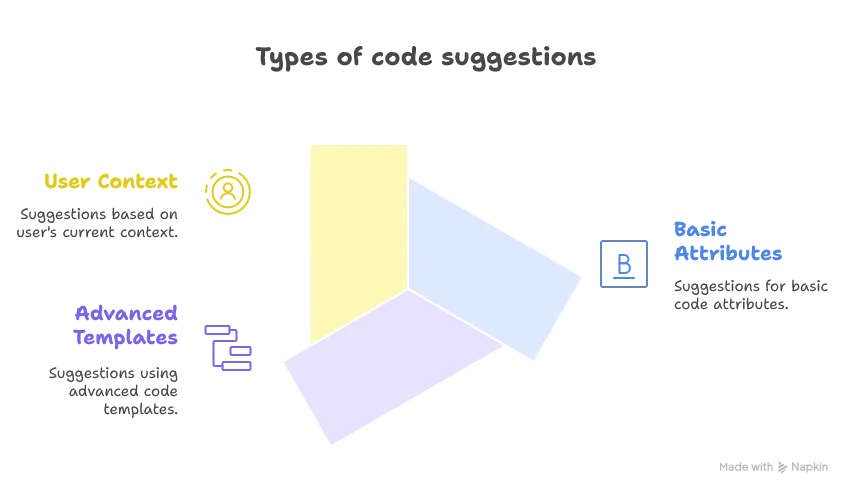
The SchemaReader implementation will be very useful for the basic and advanced code suggestions, and we will leverage our parsed config file from our custom HoconParser to implement value suggestions.
Context-Aware Value Suggestions
Let’s start with the most important use case of leveraging the user’s parsed config file: suggesting values for any inputId(s) and outputId(s) of all actions definitions. These are the values bridging the dataObjects together. We can see them as the edge definitions of our data pipelines.
Let’s first create a case class representing these kind of suggestions:
case class ContextSuggestion(value: String, label: String)We can now define a component to retrieve all inputIds and outputIds:
class ContextAdvisorImpl extends ContextAdvisor:
  override def generateSuggestions(context: SDLBContext): List[ContextSuggestion] = context.parentPath.lastOption match
    case Some(value) => value match
      case "inputId" | "outputId" | "inputIds" | "outputIds" => retrieveDataObjectIds(context)
      case _ => List.empty[ContextSuggestion]
    case None => List.empty[ContextSuggestion]

  private def retrieveDataObjectIds(context: SDLBContext): List[ContextSuggestion] =
    Option(context.textContext.rootConfig.root().get("dataObjects")) match
      case Some(asConfigObject: ConfigObject) => asConfigObject.unwrapped().toScala.map { (k, v) => v match
        case jMap: JMap[?, ?] => ContextSuggestion(k, Option(jMap.get("type")).map(_.toString).getOrElse(""))
        case _ => ContextSuggestion(k, "")
      }.toList
      case _ => List.empty[ContextSuggestion]
The naming is quite important. The intention of this service is to grow and suggest other kinds of context-related suggestions in the future.
The tricky part in this implementation is that the parsed config file has what we think of as the value as a key and a type attribute with its attribute name; i.e., its direct parent.
Building the Completion Engine
We can now finally tackle the definition of our code completion engine:
class SDLBCompletionEngineImpl(private val schemaReader: SchemaReader,
  private val contextAdvisor: ContextAdvisor)
  extends SDLBCompletionEngine with SDLBLogger:
Let’s dive into it in a top-down manner:
// Following the Flyweight pattern
private val typeItem = createCompletionItem(SchemaItem("type", ItemType.STRING, " type of object", true))
private val typeList = List(typeItem)

override def generateCompletionItems(context: SDLBContext): List[CompletionItem] =
    val itemSuggestionsFromSchema = schemaReader.retrieveAttributeOrTemplateCollection(context) match
      case AttributeCollection(attributes) => generateAttributeSuggestions(attributes, context.getParentContext)
      case TemplateCollection(templates, templateType) => generateTemplateSuggestions(templates, templateType, context)

    val itemSuggestionsFromConfigContextSuggestions = contextAdvisor.generateSuggestions(context)
    val itemSuggestionsFromConfig = itemSuggestionsFromConfigContextSuggestions.map(createCompletionItem)
    val allItems = itemSuggestionsFromConfig ++ itemSuggestionsFromSchema
    if allItems.isEmpty then typeList else allItems
The general idea here is to generate all possible suggestions from both the schemaReader and the contextAdvisor and to combine them. As you may recall from the last post, we need to pattern match on the result of our schemaReader to handle differently how we are about to write the code completion if it is a list of templates or a list of simple attribute suggestions.
One thing we could enhance here is the default choice we make: if no suggestions are available, then suggest type. This has the advantage of better supporting the user by guessing the most probable attribute in cases where we never reach a valid state of the user’s file. This scenario is most probable if the user started the LSP server just after starting to write a new object definition.
Creating Context-Based Completion Items
Let’s dive into the simplest case first, suggesting possible values from the user’s context:
private def createCompletionItem(item: ContextSuggestion): CompletionItem =
    val completionItem = new CompletionItem()
    completionItem.setLabel(item.value)
    completionItem.setDetail(item.label)
    completionItem.setInsertText(item.value)
    completionItem.setKind(CompletionItemKind.Variable)
    completionItem
The mapping is as follows:
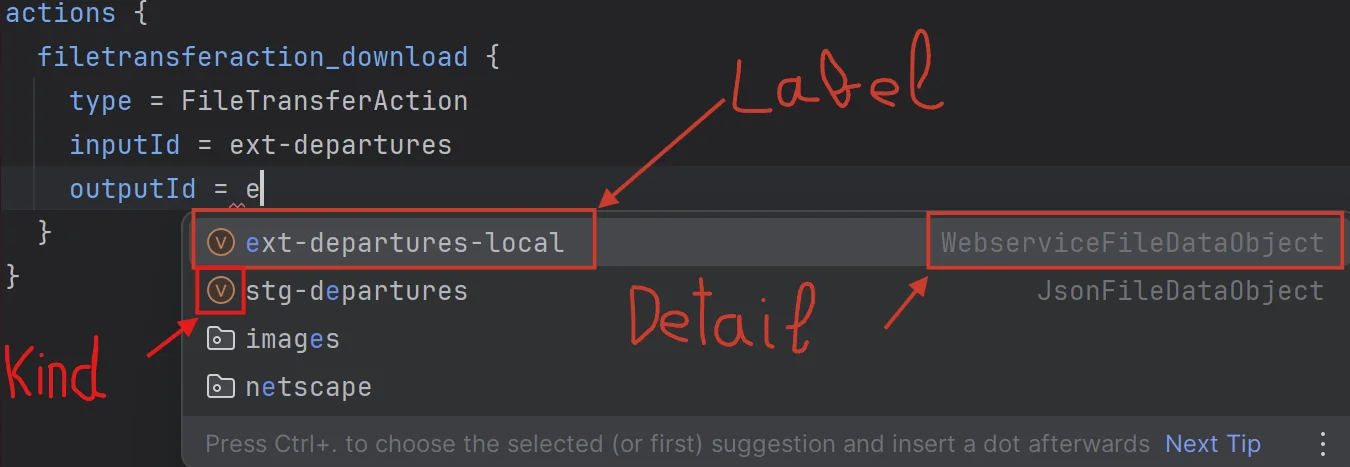
Where the insertText is the text to be written by the LSP client in the current user’s file.
Creating Schema-Based Completion Items
Suggestions for attributes from the schemaReader are similar:
private def generateAttributeSuggestions(attributes: Iterable[SchemaItem], parentContext: Option[ConfigValue]): List[CompletionItem] =
    val items = parentContext match
      case Some(config: ConfigObject) => attributes
        .filter(item => Option(config.get(item.name)).isEmpty
        || item.name == "actions" || item.name == "dataObjects")
      case _ => attributes
    items.map(createCompletionItem).toList

private def createCompletionItem(item: SchemaItem): CompletionItem =
    val completionItem = new CompletionItem()
    completionItem.setLabel(item.name)
    completionItem.setDetail(s"${if item.required then "required" else ""} ${item.itemType.name}".trim())

    val valuePart =
      if Set(ItemType.OBJECT, ItemType.TYPE_VALUE).contains(item.itemType) then
        s" ${item.itemType.defaultValue}"
      else
        s" = ${item.itemType.defaultValue}"

    completionItem.setInsertText(item.name + valuePart)
    completionItem.setKind(CompletionItemKind.Snippet)
    completionItem.setInsertTextFormat(InsertTextFormat.Snippet)
    completionItem
In this createCompletionItem method, we leverage our default value that handles the special $0 symbol to place the cursor either at the end of the completion text or inside the array or object definition (using [$0] for the former and {$0} for the latter).
We also add required information in the label if necessary. Additionally, we enhance the choice of completions by filtering out attributes that are already defined in generateAttributeSuggestions, based on the config value of the direct parent, except for actions and dataObjects. This is because in HOCON, it’s quite common to define big objects like these in multiple places and let the parser merge these definitions later.
Creating Template Suggestions with TabStops
For the template case, it’s good to first understand another feature defined in the LSP protocol: tabstops.
This feature is very useful when the user wants to generate a template. We can define ranges in the text representing where the next tab should stop to quickly allow the user to define what matters in the template, as shown in the image below:
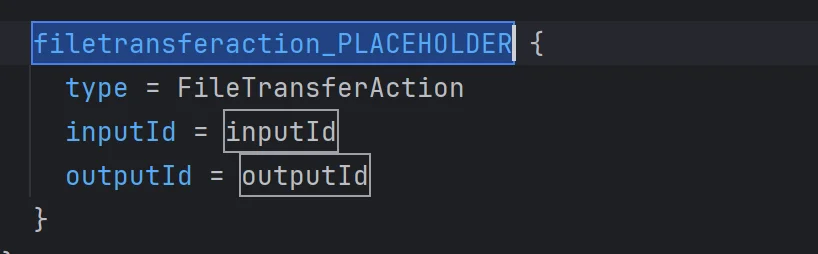
Let’s see how to implement our template case using tabstops:
private[completion] def generateTemplateSuggestions(templates: Iterable[(String, Iterable[SchemaItem])], templateType: TemplateType, context: SDLBContext): List[CompletionItem] =
    templates.map { case (actionType, attributes) =>
      val completionItem = new CompletionItem()
      completionItem.setLabel(actionType.toLowerCase)
      completionItem.setDetail("template")

      val keyName = if templateType == TemplateType.OBJECT then s"$${1:${actionType.toLowerCase}_PLACEHOLDER}" else ""
      val startObject = if templateType != TemplateType.ATTRIBUTES then "{" else ""
      val endObject = if templateType != TemplateType.ATTRIBUTES then "}" else ""

      // Build attribute snippets with tabstops
      val attributeSnippets = attributes.zipWithIndex.map { case (att, idx) =>
        val defaultValue =
          if att.name == "type" then actionType
          else s"$${${idx + 2}:${att.name}}"

        "  " + att.name + " = " + defaultValue
      }.mkString("\n")

      completionItem.setInsertText(
        s"""$keyName $startObject
          |$attributeSnippets$${0}
          |$endObject
          |""".stripMargin.replace("\r\n", "\n").trim)

      completionItem.setKind(CompletionItemKind.Snippet)
      completionItem.setInsertTextFormat(InsertTextFormat.Snippet)
      if completionItem.getInsertText.contains("${1:") then
        val data = CompletionData(
          withTabStops = true,
          parentPath = context.parentPath.mkString("->"),
          context = context.textContext.rootConfig.root().toString
        )
        completionItem.setData(data.toJson)
      completionItem
    }.toList
Let’s highlight the three most important aspects of this implementation:
-
Template Type Handling: We adapt the template format based on the
templateType(OBJECT, ARRAY_ELEMENT, or ATTRIBUTES), which determines whether we need to include key names and surrounding braces. -
TabStop Generation: We create intelligent tabstops by assigning index numbers to each attribute (
${idx + 2}:). The first tabstop (${1:...}) is used for the object name itself, and we place the final tabstop (${0}) at the end of all attributes to position the cursor after template completion. -
Metadata Attachment: We attach additional context data to completion items that use tabstops. This metadata can be used later for resolving completions or enhancing them with AI suggestions, and it includes the parent path and current context.
Wiring the Completion into the LSP Service
Now we just need to call our function in the completion method, and that’s it! We’ve fully implemented the code completion capability from A to Z:
override def completion(params: CompletionParams): CompletableFuture[messages.Either[util.List[CompletionItem], CompletionList]] = Future {
  val uri = params.getTextDocument.getUri
  val context = uriToContexts(uri)
  val caretContext = context.withCaretPosition(params.getPosition.getLine+1, params.getPosition.getCharacter)
  val completionItems: List[CompletionItem] = completionEngine.generateCompletionItems(caretContext)

  Left(completionItems.toJava).toJava
}.toJava
Implementing Hover Functionality
Now let’s tackle the hovering capability. It is actually very simple as we can leverage everything we built so far:
class SDLBHoverEngineImpl(private val schemaReader: SchemaReader) extends SDLBHoverEngine:

  override def generateHoveringInformation(context: SDLBContext): Hover =
    val markupContent = new MarkupContent()
    markupContent.setKind(MarkupKind.MARKDOWN)
    markupContent.setValue(schemaReader.retrieveDescription(context))
    new Hover(markupContent)
Then we can implement the hover method of our textDocumentService:
override def hover(params: HoverParams): CompletableFuture[Hover] = {
  Future {
    val context = getContext(params.getTextDocument.getUri)
    val hoverContext = context.withCaretPosition(params.getPosition.getLine + 1, params.getPosition.getCharacter)
    hoverEngine.generateHoveringInformation(hoverContext)
  }.toJava
}
Conclusion
In this article, we’ve successfully implemented two core LSP capabilities:
-
Code Completion with three levels of intelligence:
- Basic attribute suggestions pulled from the schema
- Context-aware value suggestions that leverage the user’s current configuration
- Rich template suggestions with tabstops for efficient editing
-
Hover Information that provides users with helpful documentation directly in their editor
What makes our implementation particularly powerful is how it leverages all the components we’ve built in previous parts:

This layered approach creates a rich, context-aware editing experience that helps users write correct HOCON configurations more efficiently.
In the next article, we’ll enhance our LSP server with ai-augmented suggestions, drastically improving the power of our LSP.
Stay tuned for Part 6: “Integrating AI for Smarter Code Completion” where we will integrate AI into our project and tackle low-latency challenges.
