
Multifile Context
Welcome to the eighth part of this LSP series. In our previous articles, we built a fully functional LSP server with AI-augmented code completion and optimized it for low latency. Now we’ll tackle one of the most powerful features for configuration files: multi-file context awareness.
When working with complex data pipeline configurations like those in Smart Data Lake Builder, definitions are often spread across multiple files. While our LSP server can already provide intelligent suggestions for a single file, it doesn’t yet understand relationships between files. In this article, we’ll implement a flexible system for grouping related files into workspaces to provide context-aware suggestions that span multiple files.
📦 View the source code on GitHub – Explore the complete implementation. Leave a star if you like it!
The Need for Multi-File Context Awareness
Now it is time to enable multi-file context awareness. First thing is to specify which files should be grouped together. A simple solution would be to merge all files together, but for the Smart Data Lake Builder case, this might not be the ideal approach. When defining data pipelines in a production environment, users may define multiple environments within the same project to ease code reuse, as some Terraform projects would do.
However, the folder’s organization for handling multi-environment might be project-dependent. This is why we should design our approach to be modular so we can implement different strategies easily. We will then implement a parser for the config of the LSP itself in the next and final part, allowing us to define which workspace strategy the user wants as well as customizing the tabstops prompt we defined in part 6, but more on that in a moment. Let’s first define four strategies to start, from most useful to more experimental:
Active Workspace
In this strategy, we define a common folder with all pipeline definitions and other files that are environment specific to become the active workspace, the main one. Other config files will be defined in isolated workspaces:
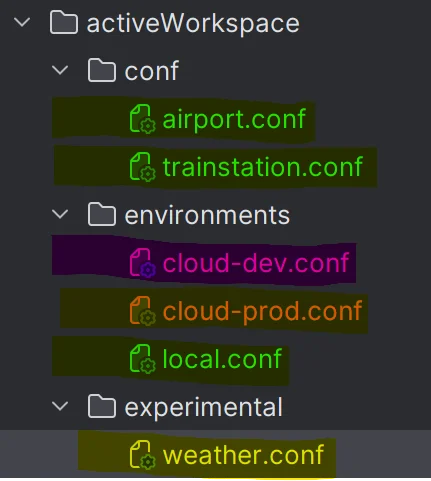
In green, we have the main workspace, the active one, and the remaining files are put in isolated workspaces highlighted in other colors.
This requires additional parameters from the user to parametrize this strategy and could be expressed like:
workspaceType = ActiveWorkspace
workspaceParameters = "activeWorkspace/conf,activeWorkspace/environments/local.conf"
Single Workspace
This strategy is quite straightforward:
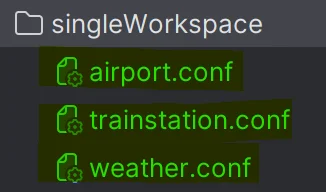
Every file is grouped together in a single workspace, as highlighted in green. No specific parameters are needed.
workspaceType = SingleWorkspaceNo Workspace
This one too is quite easy to understand:
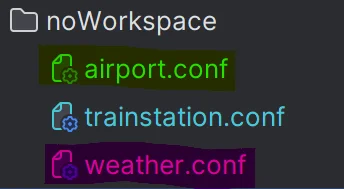
Every file is independent of each other. This was the behavior we had until now. No parameters are needed.
workspaceType = NoWorkspaceRoot Workspace
This strategy is ideal if your data pipelines have very different definitions between environments, or if you run SDLB in projects that are quite different but need to develop keeping an eye on every project in your IDE at the same time:
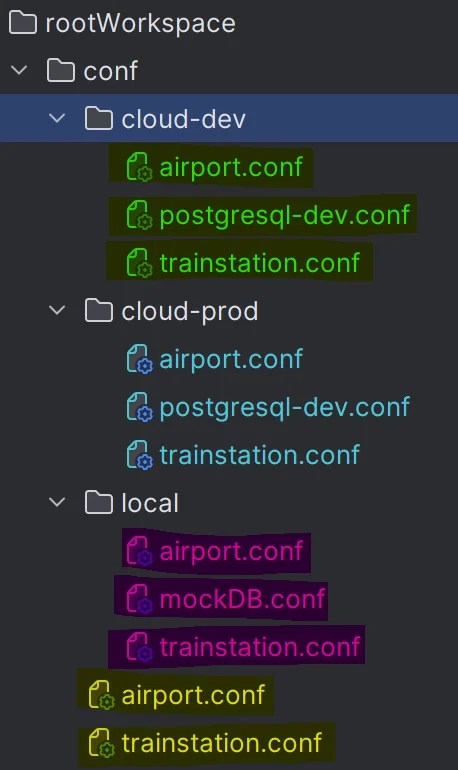
This strategy needs to define where your workspace definitions lie.
workspaceType = RootWorkspace
workspaceParameters = "rootworkspace/conf"
Global Strategy for Multi-File Management
To illustrate how we intend to manage multi-file context awareness, let’s take the SingleWorkspace strategy to simplify the example. Also to keep things not too complex, let’s use the watched files feature of the LSP protocol for now. Let’s say that the only events we receive are:

In a high-level overview, we want to manage the workspace and all SDLB contexts this way:
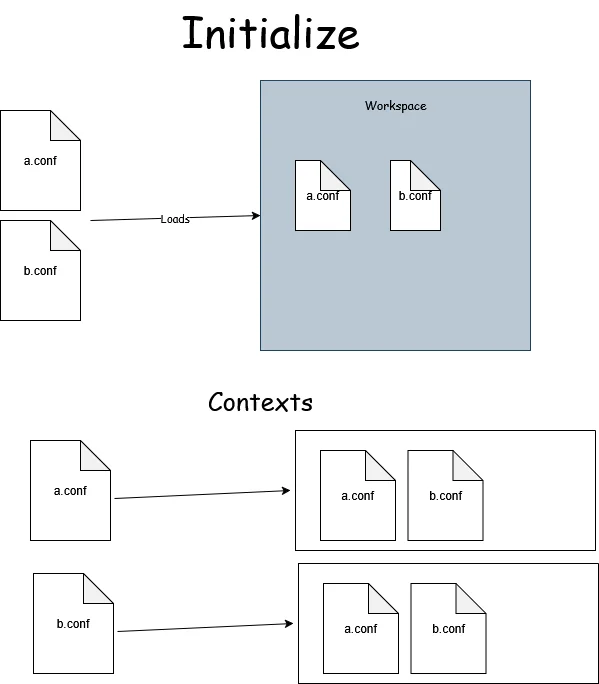
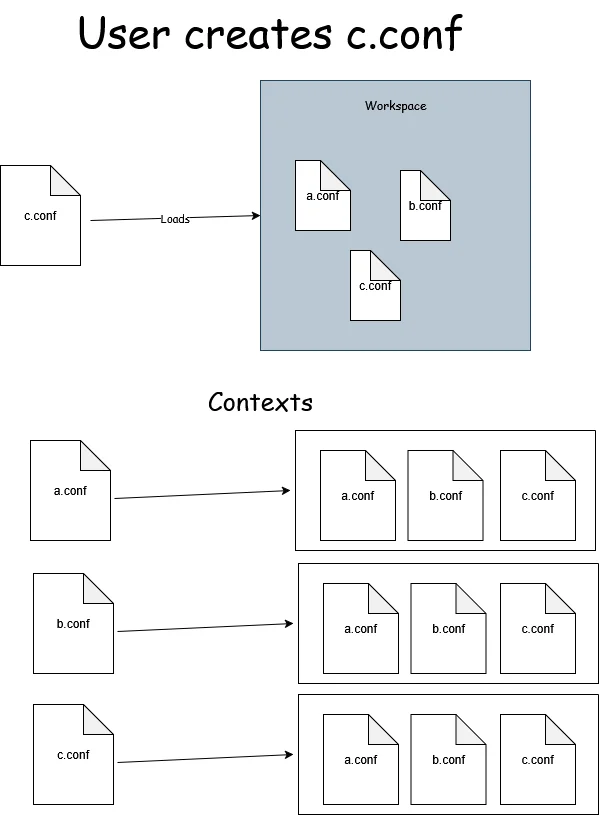
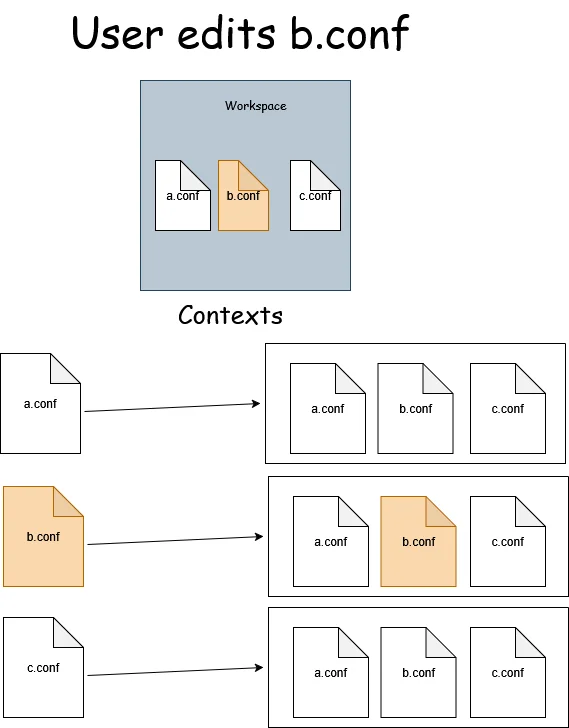
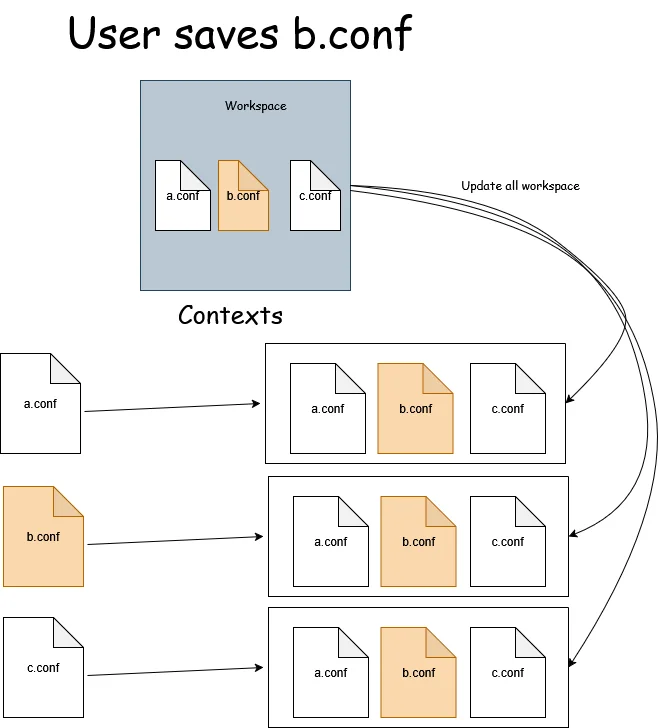
We need to update our TextDocumentService accordingly:
override def didOpen(didOpenTextDocumentParams: DidOpenTextDocumentParams): Unit =
  val uri = didOpenTextDocumentParams.getTextDocument.getUri
  val content = didOpenTextDocumentParams.getTextDocument.getText
  insert(uri, content)
  updateWorkspace(uri)

override def didChange(didChangeTextDocumentParams: DidChangeTextDocumentParams): Unit =
  val contentChanges = didChangeTextDocumentParams.getContentChanges
  update(didChangeTextDocumentParams.getTextDocument.getUri, Option(contentChanges).flatMap(_.toScala.headOption).map(_.getText).getOrElse(""))


override def didClose(didCloseTextDocumentParams: DidCloseTextDocumentParams): Unit =
  val uri = didCloseTextDocumentParams.getTextDocument.getUri
  if isUriDeleted(uri) then
    info(s"Detecting deletion of $uri")
    update(uri, "")
  updateWorkspace(uri)

override def didSave(didSaveTextDocumentParams: DidSaveTextDocumentParams): Unit =
  updateWorkspace(didSaveTextDocumentParams.getTextDocument.getUri)
In other words:
didOpenshould update all the files related to the workspace of the opened filedidChangeshould only update the given file, avoiding updating all files every time, making the LSP much more efficient.didClosedoes not tell us if the file was simply closed or deleted, so we need to manually check.didSaveshould update all files of the given workspace, as it shouldn’t happen very often, even with if the autosave mode is enabled in the IDE.
So we already know we want our WorkspaceContext trait to be able to implement the following methods: update for updating a single file, updateWorkspace for updating all the files in a workspace, isUriDeleted to detect this scenario and of course a getContext, replacing our uriToContextMap used to retrieve the context in the completion and hovering methods.
Then we need to refactor the following:
class SmartDataLakeTextDocumentService(/* as before */)(using ExecutionContext)
      extends TextDocumentService
      with WorkspaceContext with ClientAware with SDLBLogger {

  // remove uritToContextMap
  // ... as before ...

override def completion(params: CompletionParams): CompletableFuture[messages.Either[util.List[CompletionItem], CompletionList]] = Future {
    val uri = params.getTextDocument.getUri
    val context = getContext(uri) // refactor here
    val caretContext = context.withCaretPosition(params.getPosition.getLine+1, params.getPosition.getCharacter)
    // ... remaining ...
  }.toJava

// ... remaining ...
- extends the trait
WorkspaceContextwe’ll define just below - use
getContextto retrieve the context instead of using the map
Implementing the Workspace Model
Before implementing WorkspaceContext, let’s first implement our central data object for this feature. The workspace management system consists of three interconnected layers:
private[workspace] case class Workspace(name: String, contexts: Map[String, SDLBContext], contents: Map[String, String]) extends SDLBLogger:
    def updateContent(uri: String, newContent: String): Workspace =
        val updatedContents = contents.updated(uri, newContent)
        // Update only active context: not all contexts of the workspace
        val updatedContext = contexts.get(uri)
            .map(_.withText(newContent))
            .getOrElse(SDLBContext.fromText(uri, newContent, updatedContents))
        val updatedContexts = contexts.updated(uri, updatedContext)
        copy(contexts = updatedContexts, contents = updatedContents)

    def withAllContentsUpdated: Workspace =
        // Update all context of the workspace
        val newContexts = contexts.map { case (uri, context) =>
            uri -> context.withContents(contents)
        }
        trace(s"Updating all contexts (${contexts.size}) of workspace $name")
copy(contexts = newContexts)trait WorkspaceContext extends SDLBLogger:
private var uriToWorkspace: Map[String, Workspace] = Map.empty
// To be defined shortly
private var workspaceStrategy: WorkspaceStrategy = SingleWorkspace()
def getContext(uri: String): SDLBContext =
uriToWorkspace(uri).contexts(uri)
def insert(uri: String, text: String): Unit =
trace(s"Insertion: Checking context for $uri")
if !uriToWorkspace.contains(uri) then
val workspace = workspaceStrategy
.retrieve(uri, uriToWorkspace.values.toList)
.updateContent(uri, text)
trace(s"New context detected: $workspace")
uriToWorkspace = uriToWorkspace.updated(uri, workspace)
else
debug(s"Existing workspace ${uriToWorkspace(uri).name} for $uri")
def update(uri: String, contentChanges: String): Unit =
trace(s"Updating context for $uri")
val workspace = uriToWorkspace(uri)
uriToWorkspace = uriToWorkspace.updated(uri, workspace.updateContent(uri, contentChanges))
def updateWorkspace(uri: String): Unit =
require(uriToWorkspace.contains(uri), s"URI $uri not found in workspaces")
val workspace = uriToWorkspace(uri)
val updatedWorkspace = workspace.withAllContentsUpdated
uriToWorkspace = uriToWorkspace.map { case (uri, ws) => ws match
case v if v.name == workspace.name => uri -> updatedWorkspace
case v => uri -> v
}
def initializeWorkspaces(rootUri: String): Unit =
val rootPath = path(rootUri)
if Files.exists(rootPath) && Files.isDirectory(rootPath) then
val configFiles = Files.walk(rootPath)
.filter(path => Files.isRegularFile(path) && path.toString.endsWith(".conf"))
.toScala
val contents = configFiles.map { file => file.toUri().toString() ->
Try {
val text = Files.readString(file)
if SDLBContext.isConfigValid(text) then
text
else
warn(s"Invalid config file: ${file.toUri().toString()}")
""
}.getOrElse("")
}.toMap
// Fix a workspace strategy for now. Will be configurable in next part
workspaceStrategy = WorkspaceStrategy(rootUri, "SingleWorkspace", "")
info(s"Using workspace strategy: $workspaceType with parameters: $workspaceParameters")
info(s"loaded ${contents.size} config files from $rootUri")
uriToWorkspace = workspaceStrategy.buildWorkspaceMap(rootUri, contents)
debug(s"Initialized workspaces: ${uriToWorkspace.map((key, v) => key.toString + " -> " + v.contexts.size).mkString("\n", "\n", "")}")
def isUriDeleted(uri: String): Boolean = !Files.exists(path(uri))trait WorkspaceStrategy:
def retrieve(uri: String, workspaces: List[Workspace]): Workspace
protected def groupByWorkspaces(rootUri: String, contents: Map[String, String]): Map[String, Map[String, String]]
def buildWorkspaceMap(rootUri: String, contents: Map[String, String]): Map[String, Workspace] =
groupByWorkspaces(rootUri, contents).flatMap { case (workspaceName, contents) =>
val contexts = contents.map { case (uri, content) =>
uri -> SDLBContext.fromText(uri, content, contents)
}
val ws = Workspace(workspaceName, contexts, contents)
contexts.map { case (uri, _) =>
uri -> ws
}
}
object WorkspaceStrategy:
def apply(rootUri: String, workspaceType: String, workspaceParameters: String): WorkspaceStrategy = workspaceType.toLowerCase().trim() match
case "rootworkspace" => RootWorkspace(rootUri, workspaceParameters)
case "activeworkspace" => ActiveWorkspace(workspaceParameters)
case "singleworkspace" => SingleWorkspace()
case "noworkspace" => NoWorkspace()
case _ => throw new IllegalArgumentException(s"Unknown workspace type: $workspaceType")class SingleWorkspace extends WorkspaceStrategy with SDLBLogger:
override def retrieve(uri: String, workspaces: List[Workspace]): Workspace =
warn(s"RootURI as a single workspace should handle all case. Abnormal call to method 'retrieve' with $uri")
val contents = Map(uri -> "")
Workspace(
uri,
Map(uri -> SDLBContext.fromText(uri, "", contents)),
contents)
override def groupByWorkspaces(rootUri: String, contents: Map[String, String]): Map[String, Map[String, String]] =
Map(rootUri -> contents)Here’s what each layer provides:
Workspace - The central data object with:
updateContent: updates only the given uri and the sharedcontentsmap, but don’t update every context yetwithAllContentsUpdated: update the reference to thecontentsmap to every context of the workspace
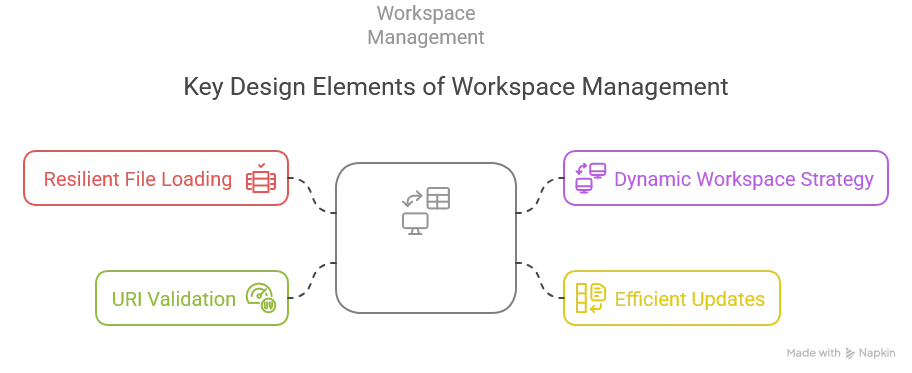
WorkspaceContext - The trait managing workspace state with several key design elements:
-
Resilient File Loading: In the
initializeWorkspacesmethod, we wrap the file reading in aTryblock and check if each config is valid usingSDLBContext.isConfigValid. This ensures that invalid configuration files don’t crash the server—they’re simply ignored with a warning. -
Dynamic Workspace Strategy: The trait is designed to work with any workspace strategy implementation. Currently, we’re hardcoding
SingleWorkspacebut in a future article, we’ll make this configurable. -
Efficient Updates: The
updatemethod only updates a single file’s context, whileupdateWorkspaceupdates all contexts in a workspace. This balance allows for efficient editing while maintaining consistency across related files. -
URI Validation: We check for existence and validity of URIs at various points to prevent errors. The
isUriDeletedmethod helps us distinguish between a closed file and a deleted one.
WorkspaceStrategy - The strategy pattern implementation with key points:
- Forcing implementation to give a
retrievestrategy: when the uri is not currently in the map, we need to implement an algorithm that will depend on the strategy - Using the template method pattern, one of my favorite, to define a general algorithm for building the initial workspaces. Every implementers only need to focus on a method called
groupByWorkspaces - Leveraging the companion object in Scala to define our
Factory:objects in scala are guaranteed to be instantiated only once in the JVM.
SingleWorkspace - A concrete strategy implementation. This strategy should actually never have its retrieve method called, because we should always match the same workspace having as prefix the root uri of the project, as shown in groupByWorkspaces. However, if that happens, we know how to handle it, so we prefer to log a warning instead and implement it nevertheless.
Also, notice we need now to call SDLBContext.fromText with two additional parameters: uri and contents. We’ll refactor this class accordingly at the end.
Enhancing the Core Components
Now is time to dive deeper in the layers and change our core components to allow our HOCON parser manage multiple files. Both SDLBContext and TextContext need to be enhanced for multi-file awareness:
case class SDLBContext private(textContext: TextContext, parentPath: List[String], word: String) extends SDLBLogger:
  export textContext.{isConfigCompleted, rootConfig}

  def withText(newText: String): SDLBContext = copy(textContext = textContext.update(newText))

  def withContents(newContents: Map[String, String]): SDLBContext =
    copy(textContext = textContext.withContents(newContents))

  def withCaretPosition(originalLine: Int, originalCol: Int): SDLBContext =
    val TextContext(_, originalText, _, configText, config, _) = textContext
    // ... as before ...


  def getParentContext: Option[ConfigValue] =
    // ... as before ...

object SDLBContext:
  val EMPTY_CONTEXT: SDLBContext = SDLBContext(EMPTY_TEXT_CONTEXT, List(), "")

  def fromText(uri: String, originalText: String, workspaceUriToContents: Map[String, String]): SDLBContext =
    SDLBContext(TextContext.create(uri, originalText, workspaceUriToContents), List(), "")

  def fromText(originalText: String): SDLBContext = fromText("", originalText, Map.empty)

def isConfigValid(text: String): Boolean = HoconParser.parse(text).isDefinedcase class TextContext private (uri: String, originalText: String, workspaceUriToContents: Map[String, String], configText: String, rootConfig: Config, isConfigCompleted: Boolean = true) extends SDLBLogger {
def withContents(newContents: Map[String, String]): TextContext = copy(workspaceUriToContents=newContents)
def update(newText: String): TextContext = this match
case EMPTY_TEXT_CONTEXT => TextContext.create(uri, newText, workspaceUriToContents)
case _ => updateContext(newText)
private def updateContext(newText: String) =
val newConfigText = MultiLineTransformer.flattenMultiLines(newText)
val fullText = (newConfigText::workspaceUriToContents.removed(uri).values.toList).mkString("\n")
val newConfigOption = HoconParser.parse(fullText)
val isConfigCompleted = newConfigOption.isDefined
val newConfig = newConfigOption.getOrElse(HoconParser.EMPTY_CONFIG)
if newConfig == HoconParser.EMPTY_CONFIG then
copy(originalText=newText, isConfigCompleted=isConfigCompleted)
else
copy(originalText=newText, configText=newConfigText, rootConfig=newConfig, isConfigCompleted=isConfigCompleted)
}The key changes to SDLBContext are:
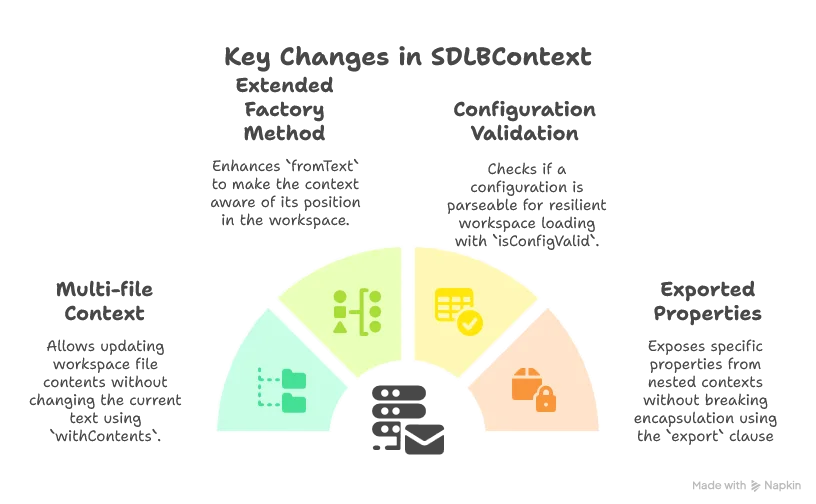
The key changes to TextContext are:
-
Workspace Awareness: Added fields for
uriandworkspaceUriToContentsto make each context aware of its place in the workspace -
Multi-file Parsing: The crucial change is in
updateContext, where we now merge the current file with all other files in the workspace before parsing. This allows HOCON’s natural merging capabilities to work across files. -
File Precedence: We put the current file’s content first in the merge list, ensuring it takes precedence in case of conflicts. We also explicitly remove the current URI from the workspace contents to avoid duplication.
-
Completion Tracking: Added an
isConfigCompletedflag to track whether the current configuration state can be successfully parsed, which helps with error handling.
Wiring Everything Together
Last but not least, we need to call the initialization phase from our LanguageServer implementation:
override def initialize(initializeParams: InitializeParams): CompletableFuture[InitializeResult] = {
    initializeWorkspaces(initializeParams)
    val initializeResult = InitializeResult(ServerCapabilities())
    initializeResult.getCapabilities.setTextDocumentSync(TextDocumentSyncKind.Full)
    val completionOptions = CompletionOptions()
    completionOptions.setResolveProvider(true)
    initializeResult.getCapabilities.setCompletionProvider(completionOptions)

    initializeResult.getCapabilities.setHoverProvider(true)
    Future(initializeResult).toJava
  }

  private def initializeWorkspaces(initializeParams: InitializeParams): Unit =
    val rootUri = Option(initializeParams).flatMap(_.getWorkspaceFolders
      .toScala
      .headOption
      .map(_.getUri))
      .getOrElse("")
    textDocumentService.initializeWorkspaces(rootUri)
But wait, how could we call initializeWorkspaces from a TextDocumentService? That’s right, we can’t. This is why we also need to change the definition of this class in our custom Dependency Injection module.
In AppModule:
lazy val textDocumentService: TextDocumentService & WorkspaceContext = new SmartDataLakeTextDocumentService(completionEngine, hoverEngine, aiCompletionEngine)Conclusion
In this article, we’ve successfully implemented multi-file context awareness for our LSP server, a powerful feature that allows it to provide intelligent suggestions based on relationships between different configuration files.
Our implementation highlights several Scala 3 strengths:
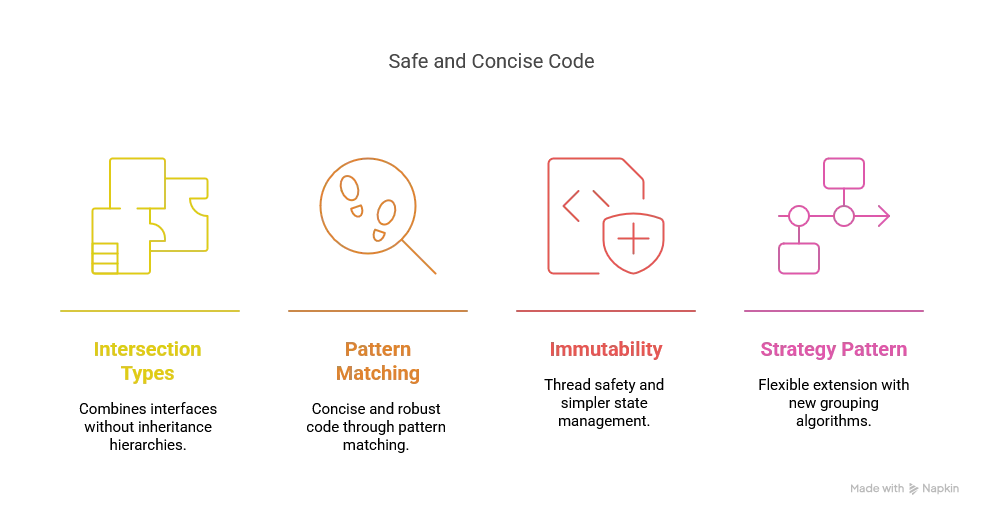
By implementing multi-file awareness, our LSP server can now:
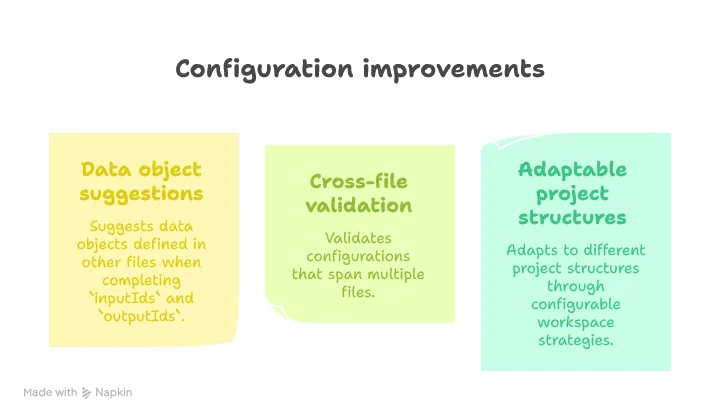
In the next article, we’ll look at how to make our workspace strategy and AI prompt configurable through user settings.
Stay tuned for “Building a Scala 3 LSP Server - Part 9: Making the LSP Server Configurable”!
