
Core Functionality
Welcome to the second part of this LSP series. After presenting the general architecture of the LSP server in Part 1, we’ll now dive deeper into the implementation, starting with the setup of LSP4J and the logging management system.
What You’ll Learn
By the end of this part, you will be able to streamline logs directly into your LSP client:

📦 View the source code on GitHub – Explore the complete implementation. Leave a star of you like it!
Setting Up the Project
First, we need to import the LSP library. You may use SBT, Mill, Maven, or any dependency management tool. Here’s an example using Maven:
<project xmlns="http://maven.apache.org/POM/4.0.0" xmlns:xsi="http://www.w3.org/2001/XMLSchema-instance" xsi:schemaLocation="http://maven.apache.org/POM/4.0.0 http://maven.apache.org/maven-v4_0_0.xsd">
  <modelVersion>4.0.0</modelVersion>
  <groupId>io.smartdatalake</groupId>
  <artifactId>sdl-lsp</artifactId>
  <version>1.0-SNAPSHOT</version>
  <name>${project.artifactId}</name>
  <description>LSP implementation for the Smart Data Lake config files</description>
  <inceptionYear>2023</inceptionYear>

  <organization>
    <name>ELCA Informatique SA</name>
    <url>https://www.elca.ch</url>
  </organization>

  <licenses>
    <license>
      <name>GNU General Public License (GPL) version 3</name>
      <url>https://www.gnu.org/licenses/gpl-3.0.html</url>
    </license>
  </licenses>

  <properties>
    <maven.compiler.source>21</maven.compiler.source>
    <maven.compiler.target>21</maven.compiler.target>
    <encoding>UTF-8</encoding>
    <scala.version>3.3.4</scala.version> <!-- Scala 2.12 not working because of copies of annotations issues -->
    <lsp4j.version>0.21.0</lsp4j.version>
    <typesafe.config.version>1.4.3</typesafe.config.version>
    <ujson.version>3.1.2</ujson.version>
    <logback.version>1.4.12</logback.version>
  </properties>

  <dependencies>
    <dependency>
      <groupId>org.scala-lang</groupId>
      <artifactId>scala3-library_3</artifactId>
      <version>${scala.version}</version>
    </dependency>

    <!-- LSP4J -->
    <dependency>
      <groupId>org.eclipse.lsp4j</groupId>
      <artifactId>org.eclipse.lsp4j</artifactId>
      <version>${lsp4j.version}</version>
    </dependency>

    <!-- Tests -->
    <dependency>
      <groupId>org.scalatest</groupId>
      <artifactId>scalatest_3</artifactId>
      <version>3.2.10</version>
      <scope>test</scope>
    </dependency>
  </dependencies>

  <build>
    <sourceDirectory>src/main/scala</sourceDirectory>
    <testSourceDirectory>src/test/scala</testSourceDirectory>
    <plugins>
      <!-- Creates a JAR file with the source files of the project. -->
      <plugin>
        <groupId>org.apache.maven.plugins</groupId>
        <artifactId>maven-source-plugin</artifactId>
        <version>3.3.0</version>
        <executions>
          <execution>
            <id>attach-sources</id>
            <goals>
              <goal>jar-no-fork</goal>
            </goals>
          </execution>
        </executions>
      </plugin>
      <plugin>
        <!-- see http://davidb.github.com/scala-maven-plugin -->
        <groupId>net.alchim31.maven</groupId>
        <artifactId>scala-maven-plugin</artifactId>
        <version>4.5.4</version>
        <configuration>
          <args>
            <arg>-deprecation</arg>
          </args>
        </configuration>
        <executions>
          <execution>
            <goals>
              <goal>compile</goal>
              <goal>testCompile</goal>
            </goals>
          </execution>
        </executions>
      </plugin>
      <plugin>
        <groupId>org.apache.maven.plugins</groupId>
        <artifactId>maven-assembly-plugin</artifactId>
        <version>2.4</version>
        <configuration>
            <descriptorRefs>
                <descriptorRef>jar-with-dependencies</descriptorRef>
            </descriptorRefs>
            <archive>
                <manifest>
                    <mainClass>io.smartdatalake.Main</mainClass>
                </manifest>
            </archive>
        </configuration>
        <executions>
            <execution>
                <phase>package</phase>
                <goals>
                    <goal>single</goal>
                </goals>
            </execution>
        </executions>
      </plugin>
      <!-- disable surefire -->
      <plugin>
        <groupId>org.apache.maven.plugins</groupId>
        <artifactId>maven-surefire-plugin</artifactId>
        <version>2.7</version>
        <configuration>
          <skipTests>true</skipTests>
        </configuration>
      </plugin>
      <!-- enable scalatest -->
      <plugin>
        <groupId>org.scalatest</groupId>
        <artifactId>scalatest-maven-plugin</artifactId>
        <version>2.0.0</version>
        <configuration>
          <reportsDirectory>
            ${project.build.directory}/scalatest-reports
          </reportsDirectory>
          <junitxml>.</junitxml>
          <filereports>
            ${project.artifactId}.txt
          </filereports>
        </configuration>
        <executions>
          <execution>
            <goals>
              <goal>test</goal>
            </goals>
          </execution>
        </executions>
      </plugin>
    </plugins>
  </build>
</project>
Dependency Management with Scala 3
The project might grow quite big, so it’s a good idea to have a dependency management system. But why use big frameworks like Spring when we have Scala 3? One of the great strengths of Scala 3 is its lazy feature. Thanks to this, we can manage dependencies ourselves quite easily. Moreover, it gives us control over how we want to mock our classes in tests without depending on advanced mocking tools. We’ll cover that more in the testing part of a future article.
Below is the complete code for our dependency management system, giving you a sneak peek of what the final result would look like in the bigger picture:
package io.smartdatalake.modules

(imports ...)

trait AppModule:
  lazy val schemaReader: SchemaReader = new SchemaReaderImpl("sdl-schema/sdl-schema-2.5.0.json")
  lazy val contextAdvisor: ContextAdvisor = new ContextAdvisorImpl
  lazy val completionEngine: SDLBCompletionEngine = new SDLBCompletionEngineImpl(schemaReader, contextAdvisor)
  lazy val hoverEngine: SDLBHoverEngine = new SDLBHoverEngineImpl(schemaReader)

  // AI Completion: Prefers colder start over slow first completion response: so no lazy val here
  val modelClient: ModelClient = new GeminiClient(Option(System.getenv("GOOGLE_API_KEY")))
  lazy val ioExecutorService: ExecutorService = Executors.newCachedThreadPool()
  lazy val ioExecutionContext: ExecutionContextExecutorService = ExecutionContext.fromExecutorService(ioExecutorService)
  val aiCompletionEngine: AICompletionEngineImpl = new AICompletionEngineImpl(modelClient)(using ioExecutionContext)

  lazy val serviceExecutorService: ExecutorService = Executors.newCachedThreadPool()
  lazy val serviceExecutionContext: ExecutionContext & ExecutorService = ExecutionContext.fromExecutorService(serviceExecutorService)
  lazy given ExecutionContext = serviceExecutionContext

  lazy val textDocumentService: TextDocumentService & WorkspaceContext & ClientAware = new SmartDataLakeTextDocumentService(completionEngine, hoverEngine, aiCompletionEngine)
  lazy val workspaceService: WorkspaceService = new SmartDataLakeWorkspaceService
  lazy val configurator: Configurator = new Configurator(aiCompletionEngine)
  lazy val languageServer: LanguageServer & LanguageClientAware = new SmartDataLakeLanguageServer(textDocumentService, workspaceService, configurator)

class Configurator(aiCompletionEngine: AICompletionEngineImpl):
  def configureApp(lspConfig: SDLBContext): Unit =
    aiCompletionEngine.tabStopsPrompt = Try(lspConfig.rootConfig.getString("tabStopsPrompt")).toOption
Let’s examine the key components:
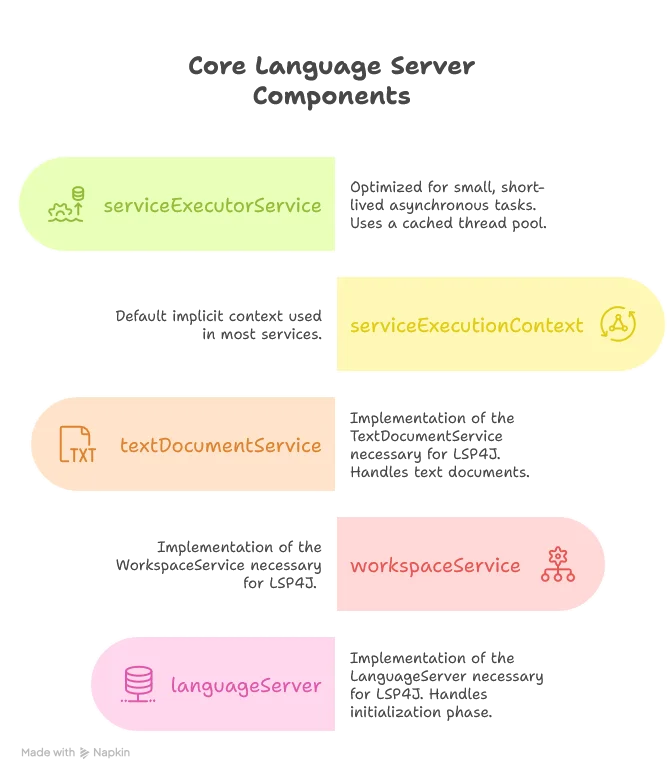
Scala offers us three interesting features here:
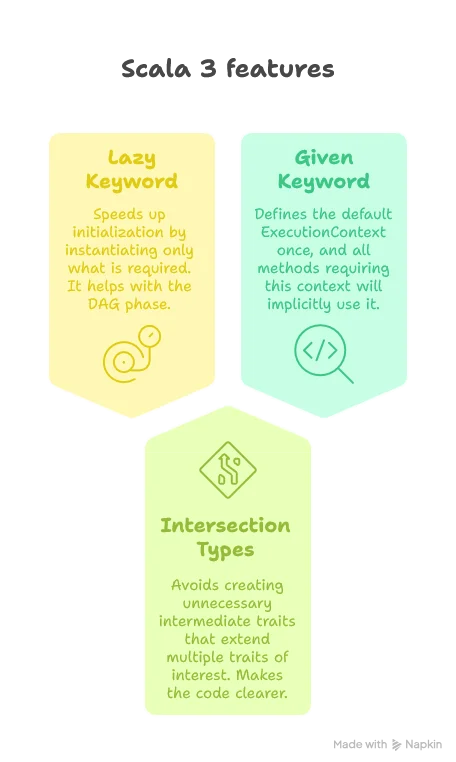
The Main Entry Point
Now let’s create the Main method, extending AppModule so it has access to all services of the application:
object Main extends AppModule with SDLBLogger {

  def main(args: Array[String]): Unit = {
    // Parse command line arguments
    val clientType = parseClientType(args)

    // We're using Standard Input and Standard Output for communication, so we need to ensure Standard Output is only used by the LSP4j server.
    // Keep a reference on the default standard output
    val systemOut = System.out

    // redirect default output to the same stream of the logback logger
    LoggingManager.redirectStandardOutputToLoggerOutput()

    // give the Standard Output reference for the server.
    startServer(System.in, systemOut, clientType)
  }

  private def parseClientType(args: Array[String]): ClientType = {

    def parseArgs(remainingArgs: List[String]): ClientType = remainingArgs match {
      case "--client" :: clientName :: _ =>
        clientName.toLowerCase match {
          case "vscode" =>
            info("Client identified as VSCode")
            ClientType.VSCode
          case "intellij" =>
            info("Client identified as IntelliJ")
            ClientType.IntelliJ
          case unknown =>
            warn(s"Unknown client type: $unknown, defaulting to Unknown")
            ClientType.Unknown
        }
      case _ :: tail => parseArgs(tail)
      case Nil =>
        info("No client type specified, defaulting to Unknown")
        ClientType.Unknown
    }

    parseArgs(args.toList)
  }

  private def startServer(in: InputStream, out: PrintStream, clientType: ClientType) = {
    val sdlbLanguageServer: LanguageServer & LanguageClientAware = languageServer

    try
      val launcher: Launcher[LanguageClient] = Launcher.Builder[LanguageClient]()
        .traceMessages(PrintWriter(LoggingManager.createPrintStreamWithLoggerName("jsonRpcLogger", level = Level.TRACE)))
        .setExecutorService(serviceExecutorService)
        .setInput(in)
        .setOutput(out)
        .setRemoteInterface(classOf[LanguageClient])
        .setLocalService(sdlbLanguageServer)
        .create()

      val client: LanguageClient = launcher.getRemoteProxy
      sdlbLanguageServer.connect(client)
      ClientLogger.lspClient = Some(client)
      textDocumentService.clientType = clientType
      // Use the configured logger
      info("Server starts listening...")
      launcher.startListening().get()
    catch
      case NonFatal(ex) =>
        ex.printStackTrace(out)
        error(ex.toString)

    finally
      serviceExecutionContext.shutdownNow()
      serviceExecutorService.shutdownNow()
      ioExecutionContext.shutdownNow()
      ioExecutorService.shutdownNow()
      sys.exit(0)
  }
}
In the Main class, we first parse command-line arguments to identify the client type (VSCode, IntelliJ, etc.). Then, we redirect the standard output to a logger, as we’ll need the actual standard output stream exclusively for LSP communication.
The startServer method creates a launcher that connects our language server implementation to the client. It sets up the input and output streams, the executor service, and starts listening for client requests. We also set up proper error handling and ensure all resources are cleaned up when the server shuts down.
Advanced Logging Management
One tricky part when designing an LSP server is that accidentally putting a println statement somewhere will crash the application, since the output stream is actually used for the LSP Server process to communicate with the client.
We therefore need to redirect our output stream to a log file and give the actual process output stream to LSP4J (as we did when calling startServer).
Redirecting Standard Output
The implementation is as follows:
object LoggingManager {

  def redirectStandardOutputToLoggerOutput(): Unit =
    val redirectedPrintStream = createPrintStreamWithLoggerName("redirectedOutput")
    System.setOut(redirectedPrintStream)
    println("Using new default output stream")

  def createPrintStreamWithLoggerName(loggerName: String, level: Level = Level.INFO): PrintStream =
    val logger = LoggerFactory.getLogger(loggerName)
    val printMethod: String => Unit = level match
      case Level.TRACE => logger.trace
      case Level.DEBUG => logger.debug
      case Level.INFO => logger.info
      case Level.WARN => logger.warn
      case Level.ERROR => logger.error
    PrintStream(LoggerOutputStream(printMethod))
}
The LoggerOutputStream class is simple but effective:
private[logging] class LoggerOutputStream(write: String => Unit) extends OutputStream {
  private val builder = new StringBuilder
  override def write(b: Int): Unit = {
    if (b == '\n') {
      write(builder.toString)
      builder.clear()
    } else {
      builder.append(b.toChar)
    }
  }
}
Notice the use of private[logging], allowing us to keep the method only visible to the logging package. This is what we want: only classes in this package should be able to use it, along with tests that follow a similar package path.
Setting Up Logback Configuration
Logs and the ability to debug are crucial for such a system. Let’s add Logback, an implementation of the SLF4J protocol:
<configuration>

    <!-- Appender to write logs to a file -->
    <appender name="FILE" class="ch.qos.logback.core.rolling.RollingFileAppender">
        <file>logs/sdl-lsp.log</file>
        <rollingPolicy class="ch.qos.logback.core.rolling.FixedWindowRollingPolicy">
            <fileNamePattern>logs/sdl-lsp.%i.log</fileNamePattern>
            <minIndex>1</minIndex>
            <maxIndex>10</maxIndex>
        </rollingPolicy>
        <triggeringPolicy class="ch.qos.logback.core.rolling.SizeBasedTriggeringPolicy">
            <maxFileSize>10MB</maxFileSize>
        </triggeringPolicy>
        <encoder>
            <pattern>%date{dd-MM-yyyy HH:mm:ss.SSS} [%thread] %-5level %logger{36} - %msg%n</pattern>
        </encoder>
    </appender>

    <appender name="LSP_CLIENT" class="io.smartdatalake.logging.ClientLogger">
        <pattern>%date{HH:mm:ss.SSS} [%thread] %-5level %logger{36} - %msg%n</pattern>
    </appender>

    <!-- Root logger settings -->
    <root level="trace">
        <appender-ref ref="FILE"/>
    </root>

</configuration>
Here we define a logging strategy to write all logs into a file.
Creating a Developer-Friendly Logger Trait
A common annoyance with standard loggers is having to write verbose logging statements like logger.debug("hello {}, how are you doing? Today is {}, isn't that great?", name, day). This is confusing because we need to check what the placeholders stand for. Yet it’s necessary because using string interpolation directly could cause performance issues if the logger level is higher than the message level.
Scala comes to our rescue with a clean solution:
trait SDLBLogger:
    self =>
    protected final lazy val logger: Logger = LoggerFactory.getLogger(self.getClass)

    private val patterns = Map(
        "apiKey" -> """(?<=key=)[A-Za-z0-9_-]+""",
        "password" -> """(?<=password=)[^&\s]+""",
        "token" -> """(?<=token=)[^&\s]+""",
        "secret" -> """(?<=secret=)[^&\s]+"""
    )

    private[logging] def anonymizeMessage(message: String, anonymize: Boolean = true): String =
        Option.when(anonymize) {
            patterns.foldLeft(message) { case (msg, (key, pattern)) =>
                msg.replaceAll(pattern, "[REDACTED]")
            }
        }.getOrElse(message)


    def trace(message: => String, anonymize: Boolean = true): Unit =
        if logger.isTraceEnabled then
            logger.trace(anonymizeMessage(message, anonymize))

    def debug(message: => String, anonymize: Boolean = true): Unit =
        if logger.isDebugEnabled then
            logger.debug(anonymizeMessage(message, anonymize))

    def info(message: => String, anonymize: Boolean = true): Unit =
        if logger.isInfoEnabled then
            logger.info(anonymizeMessage(message, anonymize))

    def warn(message: => String, anonymize: Boolean = true): Unit =
        if logger.isWarnEnabled then
            logger.warn(anonymizeMessage(message, anonymize))

    def error(message: => String, anonymize: Boolean = true): Unit =
        if logger.isErrorEnabled then
            logger.error(anonymizeMessage(message, anonymize))
This trait leverages several powerful Scala features:
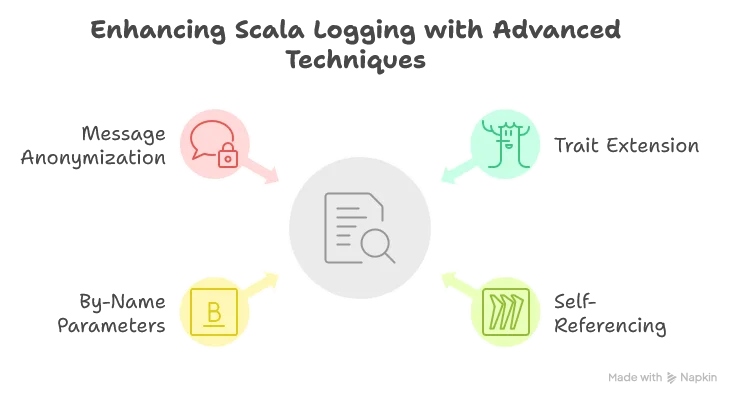
- Use of a
trait: Allows us to simply extend the trait so we can calldebugdirectly instead oflogger.debug. - Use of
self =>: This technique allows us to reference the class extending the logger rather than the logger itself. This helps identify which class is actually writing the log line rather than always seeing “SDLBLogger”. - Use of
message: => String: By adding the=>beforeString, we create a by-name parameter that is only evaluated when needed. This ensures we don’t interpolate strings unnecessarily, allowing us to safely writedebug(s"hello $name, how are you doing? Today is $day, isn't that great?"). - Security with
anonymizeMessage: We automatically redact sensitive information like API keys and passwords from our logs. Note that here the choice was to prevent in advance different kind of valid pattern matching of interest, even though only thetokenone is currently used when calling the Gemini API. I’m usually not a fan of implementing things in advance, but when it comes to security, this is perfectly justifiable. Also, the design ofanonymizeMessageis such that we redact information by default. The user has to explicitly ask to log without redacting if this is really judged necessary, for debugging purpose for example.
Sending Logs to the Client
One last improvement for a smooth developer experience is to send logs to the client. When testing and debugging our LSP, we don’t always want to look for the log file and switch context between our current user file and the logs. While some IDEs have a specific window showing client logs, they don’t typically show server logs.
We can use the LSP protocol’s window/logMessage request (offered by LSP4J with the logMessage method) to send logs directly to the client:
object ClientLogger:
    var lspClient: Option[LanguageClient] = None

class ClientLogger extends AppenderBase[ILoggingEvent]:
    // Create a layout for formatting
    private var pattern: String = "%date{dd-MM-yyyy HH:mm:ss.SSS} [%thread] %-5level %logger{36} - %msg%n"

    def setPattern(pattern: String): Unit =
        this.pattern = pattern

    private lazy val layout = {
        val patternLayout = new PatternLayout()
        patternLayout.setContext(getContext)
        patternLayout.setPattern(pattern)
        patternLayout.start()
        patternLayout
    }

    override def start(): Unit =
        if (getContext != null) then
            super.start()

    override def append(event: ILoggingEvent): Unit =
        if event.getLoggerName != "jsonRpcLogger" then
            ClientLogger.lspClient.foreach { client =>
                Try {
                    // Get the properly formatted message with timestamp, level, etc.
                    val formattedMessage = layout.doLayout(event)

                    // Map log level to LSP message type
                    val messageType = event.getLevel.levelInt match
                        case x if x >= 40000 => MessageType.Error   // ERROR, FATAL
                        case x if x >= 30000 => MessageType.Warning // WARN
                        case x if x >= 20000 => MessageType.Info    // INFO
                        case _ => MessageType.Log                   // DEBUG, TRACE

                    // Send to the client
                    client.logMessage(new MessageParams(messageType, formattedMessage.trim))
                }.recover {
                    case ex: Exception =>
                        System.err.println(s"Error sending log to LSP client: ${ex.getMessage}")
                }
            }
Here we define our custom Logback appender. Every message sent to the SDLBLogger will trigger all defined appenders, including both the file appender and this client appender.
We also need to update the Logback configuration to use this appender:
<root level="trace">
    <appender-ref ref="FILE"/>
    <appender-ref ref="LSP_CLIENT"/>
</root>
Now we have all the tools for a smooth development experience!
LSP4J Core Components
Let’s examine the core LSP components we’re implementing:
The Language Server Implementation
class SmartDataLakeLanguageServer(
  private val textDocumentService: TextDocumentService & WorkspaceContext,
  private val workspaceService: WorkspaceService,
  private val configurator: Configurator)(using ExecutionContext) extends LanguageServer with LanguageClientAware {

  private var client: Option[LanguageClient] = None
  private var errorCode = 1

  override def initialize(initializeParams: InitializeParams): CompletableFuture[InitializeResult] = {
    // Explained in a later post
    initializeWorkspaces(initializeParams)

    // What is of interest for now
    val initializeResult = InitializeResult(ServerCapabilities())
    initializeResult.getCapabilities.setTextDocumentSync(TextDocumentSyncKind.Full)
    val completionOptions = CompletionOptions()

    // Explained in a later post
    completionOptions.setResolveProvider(true)

    initializeResult.getCapabilities.setCompletionProvider(completionOptions)

    // Explained in a later post
    initializeResult.getCapabilities.setHoverProvider(true)


    Future(initializeResult).toJava
  }

  // Explained in a later post
  private def initializeWorkspaces(initializeParams: InitializeParams): Unit =
    val rootUri = Option(initializeParams).flatMap(_.getWorkspaceFolders
      .toScala
      .headOption
      .map(_.getUri))
      .getOrElse("")
    val lspConfig = textDocumentService.initializeWorkspaces(rootUri)
    configurator.configureApp(lspConfig)


  override def shutdown(): CompletableFuture[AnyRef] = {
    errorCode = 0
    CompletableFuture.completedFuture(null)
  }

  override def exit(): Unit = System.exit(errorCode)

  override def getTextDocumentService: TextDocumentService = textDocumentService

  override def getWorkspaceService: WorkspaceService = workspaceService


  override def connect(languageClient: LanguageClient): Unit = {
    client = Some(languageClient)
  }

  def getErrorCode: Int = errorCode
}
The most interesting part is the initialize method, where we negotiate with the client all the capabilities our server supports. For now, we only support code completion and hovering. The initializeWorkspaces method will be discussed in more detail in a later post.
One important point to highlight is that we use
initializeResult.getCapabilities.setTextDocumentSync(TextDocumentSyncKind.Full)which means we ask the client to always provide the full content of the current edited text rather than just the delta. This simplifies handling significantly, and since HOCON files are usually quite small, it’s an acceptable approach.
The Text Document Service
Our TextDocumentService implementation handles the core LSP functionality:
class SmartDataLakeTextDocumentService(
      private val completionEngine: SDLBCompletionEngine,
      private val hoverEngine: SDLBHoverEngine)(using ExecutionContext)
      extends TextDocumentService
      with WorkspaceContext with SDLBLogger {

  override def completion(params: CompletionParams): CompletableFuture[messages.Either[util.List[CompletionItem], CompletionList]] = ??? // To be defined later


  override def didOpen(didOpenTextDocumentParams: DidOpenTextDocumentParams): Unit = ??? // To be defined later

  override def didChange(didChangeTextDocumentParams: DidChangeTextDocumentParams): Unit = ??? // To be defined later


  override def didClose(didCloseTextDocumentParams: DidCloseTextDocumentParams): Unit = ??? // To be defined later

  override def didSave(didSaveTextDocumentParams: DidSaveTextDocumentParams): Unit =
    updateWorkspace(didSaveTextDocumentParams.getTextDocument.getUri)

  override def hover(params: HoverParams): CompletableFuture[Hover] = ??? // To be defined later
  }
The key methods we implement include:
completion: Generates and formats completion suggestionshover: Provides hover information- Document lifecycle methods (
didOpen,didChange,didClose,didSave)
The detailed implementation of the Context management, completion engine, and hover engine will be covered in future posts.
Conclusion
As we take final aim at understanding this subject completely, let’s review the targets we’ve hit:
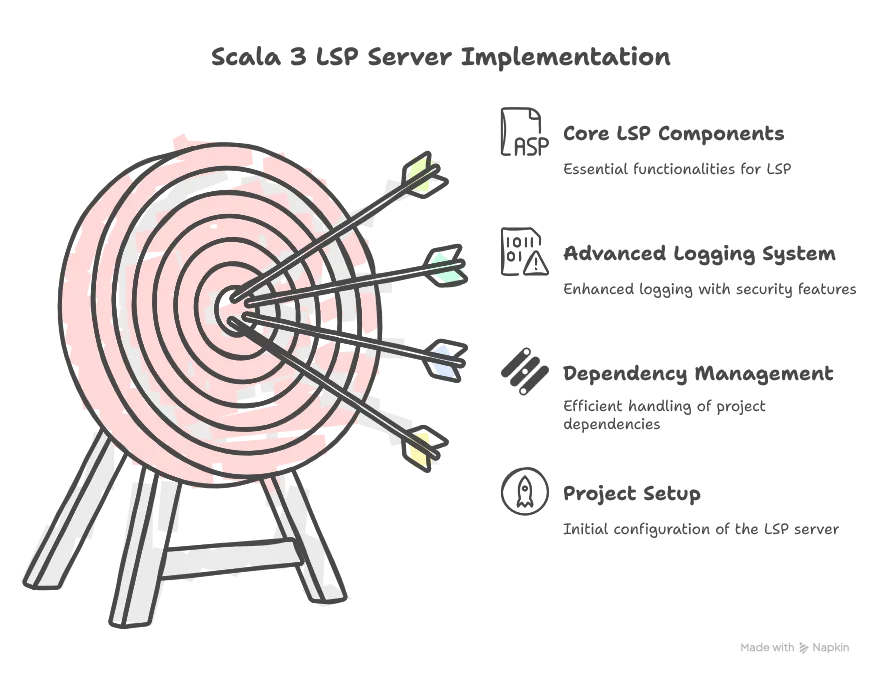
Scala 3 has proven to be an excellent choice for this project, with features like lazy initialization, intersection types, and by-name parameters making our code more concise, readable, and maintainable.
In the next article, “Parsing with Purpose: Building a Resilient Context-Aware HOCON Processor for LSP”, we’ll dive into how we parse HOCON files to extract path context based on cursor position and connect that to our schema definitions. This is the core functionality that enables our intelligent code completion and hover features.
